
출처: http://forum.chaos-project.com/index.php/topic,15782.msg195941.html#msg195941
요즘 RMMV과 다른 최근판들은 이 기능을 스크립트로 만들었지만 RMXP에는 이런 스크립트가 없었어 제가 할라고 했지만, 계속 오류가 발생되었습니다.
해외커뮤니티 Chaos Project에서 도음을 요청하다가 kk20님이 저를 도와주시고 이제 제가 자세한 방법을 고유합니다. 그분이 이 스크립트를 만들었다고 생각하면 됩니다.
경고: 시도하기전에 주프로젝트를 저장하고 백업을 하십시오! 실수하면 게임이 완전히 발생 안 할수도 있습니다!!
1) RMXP에서 스크립트 편집기를 열어십시오 (F11단축키 누르도 됩니다)
2) 기초스크립트 중에서 Scene_Battle1을 찾으십시오. Line 26있는데 이것을 찾고:
s1 = $data_system.words.attack
s2 = $data_system.words.skill
s3 = $data_system.words.guard
s4 = $data_system.words.item
@actor_command_window = Window_Command.new(160, [s1, s2, s3, s4])
@actor_command_window.y = 160
이걸로 수정하십시오:
s1 = $data_system.words.attack
s2 = $data_system.words.skill
s3 = $data_system.words.equip
s4 = $data_system.words.guard
s5 = $data_system.words.item
@actor_command_window = Window_Command.new(160, [s1, s2, s3, s4, s5])
@actor_command_window.y = 120
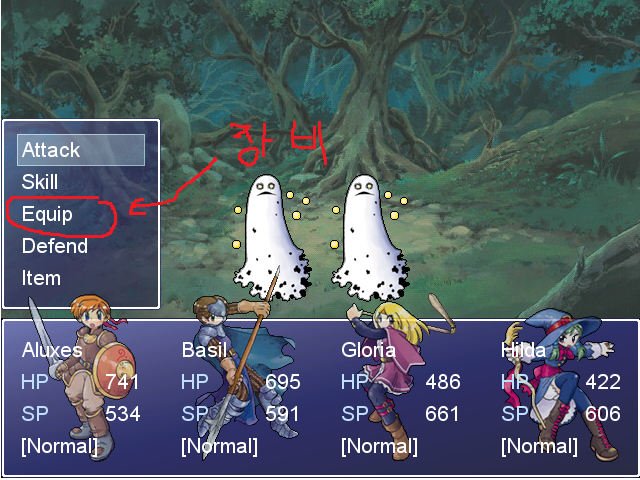
이러면 전투메뉴에서 장비할 선택이 생깁니다. 선택할꺼가 하나 더생겼니까 메뉴 사이즈도 조절해야 합니다. @actor_command_window.y 값을 120으로 수정하십시오. Scene_Battle1수정은 끝이에요.
3) 그 다음은 Scene_Battle3을 찾으십시오. 수정할겄은 Line 119입니다:
if Input.trigger?(Input::C)
# 액터 커멘드 윈도우의 커서 위치에서 분기
case @actor_command_window.index
when 0 # 공격
# 결정 SE 를 연주
$game_system.se_play($data_system.decision_se)
# 액션을 설정
@active_battler.current_action.kind = 0
@active_battler.current_action.basic = 0
# 에너미의 선택을 개시
start_enemy_select
when 1 # 스킬
# 결정 SE 를 연주
$game_system.se_play($data_system.decision_se)
# 액션을 설정
@active_battler.current_action.kind = 1
# 스킬의 선택을 개시
start_skill_select
when 2 # 방어
# 결정 SE 를 연주
$game_system.se_play($data_system.decision_se)
# 액션을 설정
@active_battler.current_action.kind = 0
@active_battler.current_action.basic = 1
# 다음의 액터의 커멘드 입력에
phase3_next_actor
when 3 # 아이템
# 결정 SE 를 연주
$game_system.se_play($data_system.decision_se)
# 액션을 설정
@active_battler.current_action.kind = 2
# 아이템의 선택을 개시
start_item_select
end
return
end
여기에서 저번 Scene_Battle1에서 해당되는 숫자로 변경하고 장비할 기능을 사입해야합니다. 저 처럼 장비를 2로 선택했으면 그냥 방어를 when 3으로 바꾸다가 아이템을 when 4로 바꾸십시오. 그 다음은 1과 3 사이에서 이겄을 사입하십시오:
when 2 # 장비
$game_system.se_play($data_system.decision_se)
Graphics.freeze
@status_window.visible = false
@actor_command_window.visible = false
@spriteset.toggle_viewports
s = Sceneless_Equip.new(@active_battler.id)
s.main
@spriteset.toggle_viewports
@status_window.visible = true
@actor_command_window.visible = true
Graphics.transition
하지만 아직은 끝이 아닙니다. 스크립트 하나를 사입해야 합니다.
4) 새로운 스크립트를 사입해야합니다. Scene Debug 아래 사입할라면 키보드에서 Ins키를 누루십시오. 무조건 Main 우에 있어야합니다.
스키립트목록은:
(다른 스크립트들)
Scene_Debug
(새 스크립트) <---
Main
이렇게 생겨야합니다.
그 새 스크립트를 Sceneless_Debug라고 이름을 정하십시오. 거기에서 이것을 복사하고 붙여놓십시오:
class Sceneless_Equip
#--------------------------------------------------------------------------
# * Object Initialization
# actor_index : actor index
# equip_index : equipment index
#--------------------------------------------------------------------------
def initialize(actor_index = 0, equip_index = 0)
@actor_index = actor_index
@equip_index = equip_index
end
#--------------------------------------------------------------------------
# * Main Processing
#--------------------------------------------------------------------------
def main
# Get actor
@actor = $game_actors[@actor_index]
# Make windows
@help_window = Window_Help.new
@left_window = Window_EquipLeft.new(@actor)
@right_window = Window_EquipRight.new(@actor)
@item_window1 = Window_EquipItem.new(@actor, 0)
@item_window2 = Window_EquipItem.new(@actor, 1)
@item_window3 = Window_EquipItem.new(@actor, 2)
@item_window4 = Window_EquipItem.new(@actor, 3)
@item_window5 = Window_EquipItem.new(@actor, 4)
# Associate help window
@right_window.help_window = @help_window
@item_window1.help_window = @help_window
@item_window2.help_window = @help_window
@item_window3.help_window = @help_window
@item_window4.help_window = @help_window
@item_window5.help_window = @help_window
# Set cursor position
@right_window.index = @equip_index
@abort = false
refresh
# Execute transition
Graphics.transition
# Main loop
loop do
# Update game screen
Graphics.update
# Update input information
Input.update
# Frame update
update
# Abort loop if screen is changed
break if @abort
end
# Prepare for transition
Graphics.freeze
# Dispose of windows
@help_window.dispose
@left_window.dispose
@right_window.dispose
@item_window1.dispose
@item_window2.dispose
@item_window3.dispose
@item_window4.dispose
@item_window5.dispose
end
#--------------------------------------------------------------------------
# * Refresh
#--------------------------------------------------------------------------
def refresh
# Set item window to visible
@item_window1.visible = (@right_window.index == 0)
@item_window2.visible = (@right_window.index == 1)
@item_window3.visible = (@right_window.index == 2)
@item_window4.visible = (@right_window.index == 3)
@item_window5.visible = (@right_window.index == 4)
# Get currently equipped item
item1 = @right_window.item
# Set current item window to @item_window
case @right_window.index
when 0
@item_window = @item_window1
when 1
@item_window = @item_window2
when 2
@item_window = @item_window3
when 3
@item_window = @item_window4
when 4
@item_window = @item_window5
end
# If right window is active
if @right_window.active
# Erase parameters for after equipment change
@left_window.set_new_parameters(nil, nil, nil)
end
# If item window is active
if @item_window.active
# Get currently selected item
item2 = @item_window.item
# Change equipment
last_hp = @actor.hp
last_sp = @actor.sp
@actor.equip(@right_window.index, item2 == nil ? 0 : item2.id)
# Get parameters for after equipment change
new_atk = @actor.atk
new_pdef = @actor.pdef
new_mdef = @actor.mdef
# Return equipment
@actor.equip(@right_window.index, item1 == nil ? 0 : item1.id)
@actor.hp = last_hp
@actor.sp = last_sp
# Draw in left window
@left_window.set_new_parameters(new_atk, new_pdef, new_mdef)
end
end
#--------------------------------------------------------------------------
# * Frame Update
#--------------------------------------------------------------------------
def update
# Update windows
@left_window.update
@right_window.update
@item_window.update
refresh
# If right window is active: call update_right
if @right_window.active
update_right
return
end
# If item window is active: call update_item
if @item_window.active
update_item
return
end
end
#--------------------------------------------------------------------------
# * Frame Update (when right window is active)
#--------------------------------------------------------------------------
def update_right
# If B button was pressed
if Input.trigger?(Input::B)
# Play cancel SE
$game_system.se_play($data_system.cancel_se)
# Switch to menu screen
@abort = true
return
end
# If C button was pressed
if Input.trigger?(Input::C)
# If equipment is fixed
if @actor.equip_fix?(@right_window.index)
# Play buzzer SE
$game_system.se_play($data_system.buzzer_se)
return
end
# Play decision SE
$game_system.se_play($data_system.decision_se)
# Activate item window
@right_window.active = false
@item_window.active = true
@item_window.index = 0
return
end
end
#--------------------------------------------------------------------------
# * Frame Update (when item window is active)
#--------------------------------------------------------------------------
def update_item
# If B button was pressed
if Input.trigger?(Input::B)
# Play cancel SE
$game_system.se_play($data_system.cancel_se)
# Activate right window
@right_window.active = true
@item_window.active = false
@item_window.index = -1
return
end
# If C button was pressed
if Input.trigger?(Input::C)
# Play equip SE
$game_system.se_play($data_system.equip_se)
# Get currently selected data on the item window
item = @item_window.item
# Change equipment
@actor.equip(@right_window.index, item == nil ? 0 : item.id)
# Activate right window
@right_window.active = true
@item_window.active = false
@item_window.index = -1
# Remake right window and item window contents
@right_window.refresh
@item_window.refresh
return
end
end
end
#--------------------------------------------------------------------------
# * Toggle Viewports
#--------------------------------------------------------------------------
class Spriteset_Battle
def toggle_viewports
@viewport1.visible = @viewport2.visible =
@viewport3.visible = @viewport4.visible = !@viewport1.visible
end
end
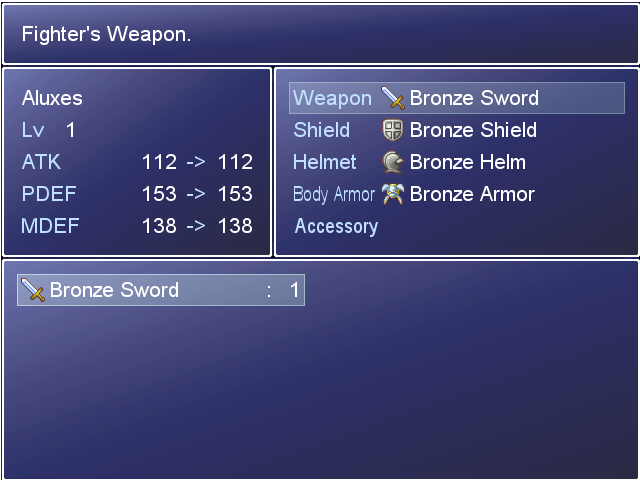
5) 그 다음은 프로젝트를 저장하고 데이타 베이스 (F9단축키) 에서 적 그룹태브에서 전투실험을 하십시오. 올바르게 했으면 진행이 잘 되야합니다!
읽어 주셨어 감사합니다! ^^
