
안녕하세요, 팀 허시의 그래픽팀장 에틴입니다. 오랜만이네요.
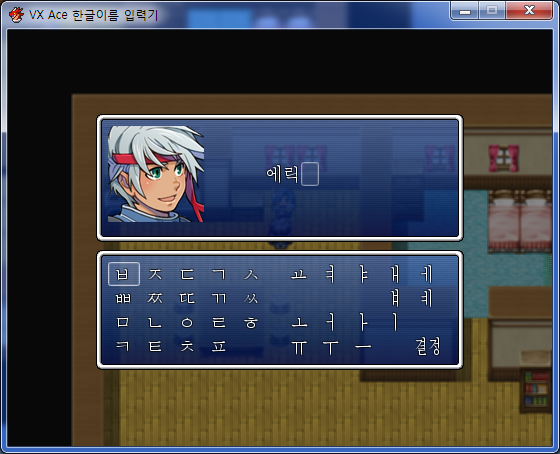
VX에 존재하던 한글 입력기를 VX Ace용으로 변경해보았습니다.
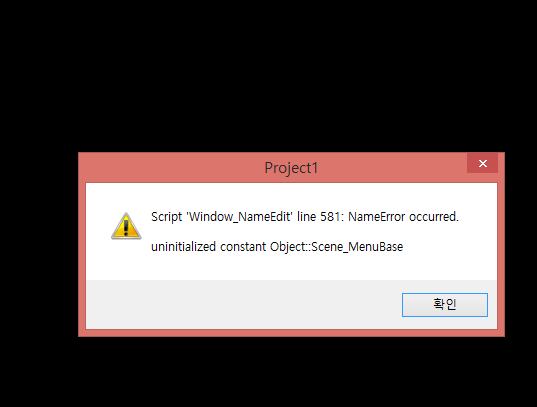
스크립트 하단부에 추가해주신 후, 일반 사용법대로 이벤트 편집기에서 '이름 입력의 처리'를 해주시면 됩니다.
텍스트 파일로도 첨부해놓으니 다운받아서 활용하셔도 괜찮습니다.
#==============================================================================
# ■ VX Ace 한글이름 입력 스크립트
#------------------------------------------------------------------------------
# VX에 존재하던 한글이름 입력 스크립트를 VX Ace용으로 개조했습니다.
# 급하게 쓰려고 짜집기한 물건이라 알려지지 않은 버그가 있을 수 있습니다.
# 기존의 소스에서 주석 부분은 번역하거나 변경하지 않았습니다.
#
# 2012. 1. 23 by 에틴. TeamHusH
#==============================================================================
#==============================================================================
# ■ Window_NameEdit
#------------------------------------------------------------------------------
# 名前入力画面で、名前を編集するウィンドウです。
#==============================================================================
class Window_NameEdit < Window_Base
#---------------------------------------------------------------------------
# ● 정수
CONSO = ["ㄱ","ㄲ","ㄳ","ㄴ","ㄵ","ㄶ","ㄷ","ㄸ","ㄹ","ㄺ","ㄻ","ㄼ","ㄽ","ㄾ","ㄿ","ㅀ","ㅁ","ㅂ","ㅃ","ㅄ","ㅅ","ㅆ","ㅇ","ㅈ","ㅉ","ㅊ","ㅋ","ㅌ","ㅍ","ㅎ"]
HEAD = ["ㄱ","ㄲ","ㄴ","ㄷ","ㄸ","ㄹ","ㅁ","ㅂ","ㅃ","ㅅ","ㅆ","ㅇ","ㅈ","ㅉ","ㅊ","ㅋ","ㅌ","ㅍ","ㅎ"]
TABLE = ["ㄱ","ㄲ","ㄳ","ㄴ","ㄵ","ㄶ","ㄷ","ㄹ","ㄺ","ㄻ","ㄼ","ㄽ","ㄾ","ㄿ","ㅀ","ㅁ","ㅂ","ㅄ","ㅅ","ㅆ","ㅇ","ㅈ","ㅊ","ㅋ","ㅌ","ㅍ","ㅎ"]
TABLE_SIDE = ["ㄱ","ㄴ","ㄹ","ㅂ"]
ANOTHER_TABLE_SIDE = [[nil,"ㅅ"],["ㅈ","ㅎ"],["ㄱ","ㅁ","ㅂ","ㅅ","ㅌ","ㅍ","ㅎ"],[nil,"ㅅ"]]
VOWEL = ["ㅏ","ㅐ","ㅑ","ㅒ","ㅓ","ㅔ","ㅕ","ㅖ","ㅗ","ㅘ","ㅙ","ㅚ","ㅛ","ㅜ","ㅝ","ㅞ","ㅟ","ㅠ","ㅡ","ㅢ","ㅣ"]
COM_VOWEL = ["ㅗ","ㅜ","ㅡ"]
ANOTHER_COM_VOWEL = [["ㅏ","ㅐ","ㅣ"],["ㅓ","ㅔ","ㅣ"],"ㅣ"]
#--------------------------------------------------------------------------
#--------------------------------------------------------------------------
# ● 公開インスタンス変数
#--------------------------------------------------------------------------
attr_reader :name # 名前
attr_reader :index # カーソル位置
attr_reader :max_char # 最大文字数
#--------------------------------------------------------------------------
# ● オブジェクト初期化
#--------------------------------------------------------------------------
def initialize(actor, max_char)
super(88, 84, 368, 128)
@actor = actor
@prompt = []
@max_char = max_char
name_array = actor.name.split(//)[0...@max_char] # 최대 문자수에 거둔다
@name = []
@default_name = []
@index = @name.size
for i in 0...name_array.size
@name << name_array[i]
@default_name << name_array[i]
end
deactivate
refresh
end
#--------------------------------------------------------------------------
# ● デフォルトの名前に戻す
#--------------------------------------------------------------------------
def restore_default
@name = @default_name
@index = @name.size
refresh
return !@name.empty?
end
#--------------------------------------------------------------------------
# ● 文字の追加
# ch : 追加する文字
#--------------------------------------------------------------------------
def add(ch)
@prompt << ch
refresh
end
#--------------------------------------------------------------------------
# ● 一文字戻す
#--------------------------------------------------------------------------
def back
@prompt == [] ? @name.pop : @prompt.pop
refresh
end
#--------------------------------------------------------------------------
# ● 顔グラフィックの幅を取得
#--------------------------------------------------------------------------
def face_width
return 96
end
#--------------------------------------------------------------------------
# ● 文字の幅を取得
#--------------------------------------------------------------------------
def char_width
text_size($game_system.japanese? ? "가" : "A").width
end
#--------------------------------------------------------------------------
# ● 名前を描画する左端の座標を取得
#--------------------------------------------------------------------------
def left
name_center = (contents_width + face_width) / 2
name_width = (@max_char + 1) * char_width
return [name_center - name_width / 2, contents_width - name_width].min
end
#--------------------------------------------------------------------------
# ● 項目を描画する矩形の取得
#--------------------------------------------------------------------------
def item_rect(index)
Rect.new(left + index * char_width, 36, char_width, line_height)
end
#--------------------------------------------------------------------------
# ● 下線の矩形を取得
#--------------------------------------------------------------------------
def underline_rect(index)
rect = item_rect(index)
rect.x += 1
rect.y += rect.height - 4
rect.width -= 2
rect.height = 2
rect
end
#--------------------------------------------------------------------------
# ● 下線の色を取得
#--------------------------------------------------------------------------
def underline_color
color = normal_color
color.alpha = 48
color
end
#--------------------------------------------------------------------------
# ● 下線を描画
#--------------------------------------------------------------------------
def draw_underline(index)
contents.fill_rect(underline_rect(index), underline_color)
end
#--------------------------------------------------------------------------
# ● 文字を描画
#--------------------------------------------------------------------------
def draw_char(index)
rect = item_rect(index)
rect.x -= 1
rect.width += 4
change_color(normal_color)
draw_text(rect, @name[index] || "")
end
#--------------------------------------------------------------------------
# ● リフレッシュ
#--------------------------------------------------------------------------
def refresh
contents.clear
draw_actor_face(@actor, 0, 0)
name = prompt_to_letter
if @name.size == @max_char
@prompt = []
name = ""
@index = @name.size - 1
else
@index = @name.size
end
for i in 0...@name.size
self.contents.draw_text(item_rect(i), @name[i], 1)
end
self.contents.draw_text(item_rect(@name.size), name, 1)
cursor_rect.set(item_rect(@index))
end
#==============================================================================
# ■ prompt_to_letter, 1st~5th phase, where?(array = from, c = what)
#------------------------------------------------------------------------------
# 이 이하는 글자를 조합하는 내용입니다.
# 다른 부분은 관계없지만, 이 이하의 부분은 수정하지 않길 권장합니다.
# 일부 폰트에서 특정 문자가 표현되지 않습니다. (삃,쮃 등등..)
#
# 2009. 3. 18 by Heircoss
#==============================================================================
def prompt_to_letter
size = @prompt.size
case size
when 0
return ""
when 1
return @prompt[0]
when 2
first_phase
when 3
second_phase
when 4
third_phase
when 5
fourth_phase
when 6
fifth_phase
end
end
def first_phase
if CONSO.include?(@prompt[0])
if CONSO.include?(@prompt[1])
c0, c1 = conso_plus_conso
else
return conso_plus_vowel
end
else
c0, c1 = vowel_plus_vowel
end
if c1 == nil
return c0
else
@name << @prompt.shift
end
return @prompt[0]
end
def second_phase
if CONSO.include?(@prompt[0])
if CONSO.include?(@prompt[1])
if CONSO.include?(@prompt[2])
@name << conso_plus_conso(@prompt.shift, @prompt.shift)
else
@name << @prompt.shift
return conso_plus_vowel
end
else
if TABLE.include?(@prompt[2])
return conso_plus_vowel_plus_table
else
c0, c1 = vowel_plus_vowel(@prompt[1], @prompt[2])
if c1 == nil
return conso_plus_vowel(@prompt[0],c0)
else
@name << conso_plus_vowel(@prompt.shift, @prompt.shift)
end
end
end
else
@name << vowel_plus_vowel(@prompt.shift, @prompt.shift)
end
return @prompt[0]
end
def third_phase
if CONSO.include?(@prompt[2])
if CONSO.include?(@prompt[3])
c0, c1 = conso_plus_conso(@prompt[2], @prompt[3])
if c1 == nil
conso, vowel, table = @prompt[0],@prompt[1],c0
return conso_plus_vowel_plus_table(conso, vowel, table)
else
conso, vowel, table = @prompt.shift, @prompt.shift, @prompt.shift
@name << conso_plus_vowel_plus_table(conso, vowel, table)
end
else
conso, vowel = @prompt.shift, @prompt.shift
@name << conso_plus_vowel(conso, vowel)
return conso_plus_vowel
end
else
if TABLE.include?(@prompt[3])
conso = @prompt[0]
vowel = vowel_plus_vowel(@prompt[1], @prompt[2])
table = @prompt[3]
return conso_plus_vowel_plus_table(conso, vowel, table)
else
conso = @prompt.shift
vowel = vowel_plus_vowel(@prompt.shift, @prompt.shift)
@name << conso_plus_vowel(conso, vowel)
end
end
return @prompt[0]
end
def fourth_phase
if CONSO.include?(@prompt[4])
if CONSO.include?(@prompt[2])
conso = @prompt.shift
vowel = @prompt.shift
table = conso_plus_conso(@prompt.shift,@prompt.shift)
@name << conso_plus_vowel_plus_table(conso, vowel, table)
else
c0, c1 = conso_plus_conso(@prompt[3], @prompt[4])
if c1 == nil
conso = @prompt[0]
vowel = vowel_plus_vowel(@prompt[1], @prompt[2])
table = c0
return conso_plus_vowel_plus_table(conso, vowel, table)
else
conso = @prompt.shift
vowel = vowel_plus_vowel(@prompt.shift, @prompt.shift)
table = @prompt.shift
@name << conso_plus_vowel_plus_table(conso, vowel, table)
end
end
else
@name << second_phase
@prompt = @prompt[3..4]
return first_phase
end
return @prompt[0]
end
def fifth_phase
if CONSO.include?(@prompt[5])
conso = @prompt.shift
vowel = vowel_plus_vowel(@prompt.shift, @prompt.shift)
table = conso_plus_conso(@prompt.shift, @prompt.shift)
@name << conso_plus_vowel_plus_table(conso, vowel, table)
else
@name << third_phase
@prompt = @prompt[4..5]
return first_phase
end
return @prompt[0]
end
def conso_plus_conso(c0 = @prompt[0], c1 = @prompt[1])
index0 = where?(TABLE_SIDE,c0)
if index0 != nil
index1 = where?(ANOTHER_TABLE_SIDE[index0],c1)
if index1 != nil
index0 = where?(CONSO, c0)
return CONSO[index0 + index1 + 1]
end
end
return c0, c1
end
def vowel_plus_vowel(c0 = @prompt[0], c1 = @prompt[1])
index0 = where?(COM_VOWEL,c0)
if index0 != nil
index1 = where?(ANOTHER_COM_VOWEL[index0],c1)
if index1 != nil
index0 = where?(VOWEL, c0)
return VOWEL[index0 + index1 + 1]
end
end
return c0, c1
end
def conso_plus_vowel(c0 = @prompt[0], c1 = @prompt[1])
index0 = where?(HEAD,c0)
index1 = where?(VOWEL,c1)
return [44032 + (588 * index0) + (28 * index1)].pack('U*')
end
def conso_plus_vowel_plus_table(c0 = @prompt[0], c1 = @prompt[1], c2 = @prompt[2])
index0 = where?(HEAD,c0)
index1 = where?(VOWEL,c1)
index2 = where?(TABLE,c2)
return [44032 + (588 * index0) + (28 * index1) + index2 + 1].pack('U*')
end
def where?(array, c)
if array.class != Array && array == c
return 0
else
array.each_with_index do |item, index|
return index if item == c
end
end
return nil
end
end
#==============================================================================
# ■ Window_NameInput
#------------------------------------------------------------------------------
# 名前入力画面で、文字を選択するウィンドウです。
#==============================================================================
class Window_NameInput < Window_Selectable
#--------------------------------------------------------------------------
# ● 문자표
# 이하 TABLE의 순서를 바꾸는 것은 스크립트의 실행에 큰 영향을 주지 않습니다.
# 다만 영어나 숫자, 기타 기호등을 집어넣을 경우는 기본적으로는 실행이 되겠지만,
# 혹시나 버그등이 발생할 수도 있습니다.
# 물론 입력할 문자등을 늘리는 이유로 칸이 부족해 창의 크기를 늘려야 한다면,
# 창의 x, y ,width, height 값을 적당히 조절하시고,
# VER_LINE, HOR_LINE, CONFIRM 또한 맞게 수정하셔야 합니다.
#--------------------------------------------------------------------------
TABLE = [ 'ㅂ','ㅈ','ㄷ','ㄱ','ㅅ', 'ㅛ','ㅕ','ㅑ','ㅐ','ㅔ',
'ㅃ','ㅉ','ㄸ','ㄲ','ㅆ', '','','','ㅒ','ㅖ',
'ㅁ','ㄴ','ㅇ','ㄹ','ㅎ', 'ㅗ','ㅓ','ㅏ','ㅣ','',
'ㅋ','ㅌ','ㅊ','ㅍ','','ㅠ','ㅜ','ㅡ','','결정']
VER_LINE = 4 #수직방향의 갯수
HOR_LINE = 10 #수평방향의 갯수
CONFIRM = 39 #결정 키 의 위치
#--------------------------------------------------------------------------
# ● オブジェクト初期化
#--------------------------------------------------------------------------
def initialize(edit_window)
super(edit_window.x, edit_window.y + edit_window.height + 8,
edit_window.width, fitting_height(VER_LINE))
@edit_window = edit_window
@page = 0
@index = 0
refresh
update_cursor
activate
end
#--------------------------------------------------------------------------
# ● 文字の取得
#--------------------------------------------------------------------------
def character
@index < 40 ? TABLE[@index] : ""
end
#--------------------------------------------------------------------------
# ● カーソル位置 決定判定
#--------------------------------------------------------------------------
def is_ok?
@index == CONFIRM
end
#--------------------------------------------------------------------------
# ● 項目を描画する矩形の取得
#--------------------------------------------------------------------------
def item_rect(index)
rect = Rect.new
rect.x = index % 10 * 32 + index % 10 / 5 * 16
rect.y = index / 10 * line_height
rect.width = 32
rect.height = line_height
rect
end
#--------------------------------------------------------------------------
# ● リフレッシュ
#--------------------------------------------------------------------------
def refresh
self.contents.clear
for i in 0...TABLE.size
rect = item_rect(i)
rect.x += 2
rect.width -= 4
self.contents.draw_text(rect, TABLE[i], 1)
end
end
#--------------------------------------------------------------------------
# ● カーソルの更新
#--------------------------------------------------------------------------
def update_cursor
cursor_rect.set(item_rect(@index))
end
#--------------------------------------------------------------------------
# ● カーソルの移動可能判定
#--------------------------------------------------------------------------
def cursor_movable?
active
end
#--------------------------------------------------------------------------
# ● カーソルを下に移動
# wrap : ラップアラウンド許可
#--------------------------------------------------------------------------
def cursor_down(wrap)
if @index < VER_LINE * HOR_LINE - HOR_LINE
@index += HOR_LINE
elsif wrap
@index -= VER_LINE * HOR_LINE - HOR_LINE
end
end
#--------------------------------------------------------------------------
# ● カーソルを上に移動
# wrap : ラップアラウンド許可
#--------------------------------------------------------------------------
def cursor_up(wrap)
if @index >= HOR_LINE
@index -= HOR_LINE
elsif wrap
@index += VER_LINE * HOR_LINE - HOR_LINE
end
end
#--------------------------------------------------------------------------
# ● カーソルを右に移動
# wrap : ラップアラウンド許可
#--------------------------------------------------------------------------
def cursor_right(wrap)
if @index % HOR_LINE < (HOR_LINE - 1)
@index += 1
elsif wrap
@index -= (HOR_LINE - 1)
end
end
#--------------------------------------------------------------------------
# ● カーソルを左に移動
# wrap : ラップアラウンド許可
#--------------------------------------------------------------------------
def cursor_left(wrap)
if @index % HOR_LINE > 0
@index -= 1
elsif wrap
@index += (HOR_LINE - 1)
end
end
#--------------------------------------------------------------------------
# ● 次のページへ移動
#--------------------------------------------------------------------------
def cursor_pagedown
@page = (@page + 1) % TABLE.size
refresh
end
#--------------------------------------------------------------------------
# ● 前のページへ移動
#--------------------------------------------------------------------------
def cursor_pageup
@page = (@page + TABLE.size - 1) % TABLE.size
refresh
end
#--------------------------------------------------------------------------
# ● カーソルの移動処理
#--------------------------------------------------------------------------
def process_cursor_move
last_page = @page
super
update_cursor
Sound.play_cursor if @page != last_page
end
#--------------------------------------------------------------------------
# ● 決定やキャンセルなどのハンドリング処理
#--------------------------------------------------------------------------
def process_handling
return unless open? && active
process_jump if Input.trigger?(:A)
process_back if Input.repeat?(:B)
process_ok if Input.trigger?(:C)
end
#--------------------------------------------------------------------------
# ● 決定にジャンプ
#--------------------------------------------------------------------------
def process_jump
if @index != CONFIRM
@index = CONFIRM
Sound.play_cursor
end
end
#--------------------------------------------------------------------------
# ● 一文字戻す
#--------------------------------------------------------------------------
def process_back
Sound.play_cancel if @edit_window.back
end
#--------------------------------------------------------------------------
# ● 決定ボタンが押されたときの処理
#--------------------------------------------------------------------------
def process_ok
if is_ok?
on_name_ok
elsif !character.empty?
on_name_add
elsif is_page_change?
Sound.play_ok
cursor_pagedown
end
end
#--------------------------------------------------------------------------
# ● 名前に文字を追加
#--------------------------------------------------------------------------
def on_name_add
if @edit_window.add(character)
Sound.play_ok
else
Sound.play_buzzer
end
end
#--------------------------------------------------------------------------
# ● 名前の決定
#--------------------------------------------------------------------------
def on_name_ok
if @edit_window.name.empty?
if @edit_window.restore_default
Sound.play_ok
else
Sound.play_buzzer
end
else
Sound.play_ok
call_ok_handler
end
end
end
#==============================================================================
# ■ Scene_Name
#------------------------------------------------------------------------------
# 名前入力画面の処理を行うクラスです。
#==============================================================================
class Scene_Name < Scene_MenuBase
#--------------------------------------------------------------------------
# ● 準備
#--------------------------------------------------------------------------
def prepare(actor_id, max_char)
@actor_id = actor_id
@max_char = max_char
end
#--------------------------------------------------------------------------
# ● 開始処理
#--------------------------------------------------------------------------
def start
super
@actor = $game_actors[@actor_id]
@edit_window = Window_NameEdit.new(@actor, @max_char)
@input_window = Window_NameInput.new(@edit_window)
@input_window.set_handler(:ok, method(:on_input_ok))
end
#--------------------------------------------------------------------------
# ● 入力[決定]
#--------------------------------------------------------------------------
def on_input_ok
prompt = @edit_window.prompt_to_letter
@actor.name =''
for i in 0...@edit_window.name.size
@actor.name += @edit_window.name[i]
end
@actor.name += prompt
return_scene
end
end





감사합니다!
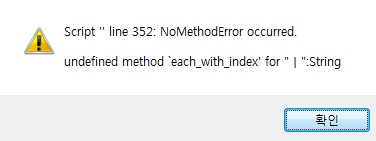
그런데 'ㅡ'를 두번 선택하면 오류나던데
방법 있나요?