
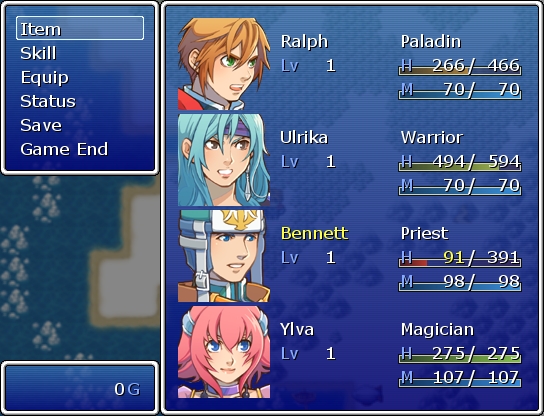
이런식으로 변경됩니다.
체력이 부족하면 빨간색 중간은 노르스름한. 풀이면 초록색.이렇게 나오죠.. 자주 쓰이는 시스템.
물론 저는 이거 안써요.^^;; 출처 : House Slasher
# ** COGWHEEL Style Menu Bars
#------------------------------------------------------------------------------
# by Syvkal
# Version 1.9
# 04-26-08
#==============================================================================
#
# USAGE:
#
# This system is Plug 'N' Play
# It has been made so it will work as soon as you put it in the Script Editor
#
# However, it has also been made so you can easily make your own bars
# To draw a bar use:
# draw_custom_gauge
#
# Followed by:
# (value, max, x, y, width, height, color1, color2, use_windowskin)
#
# Value - is the thing your bar is made to draw
# Max - is the max value of what your bar is made to draw
# x, y - are the x and y values
# width, height - are the width and height values
# use_windowskin - if set to true it will take the colours from the windowskin
# it is set to false if not specified
# Color1, Color2 - these are the two colours to be used for the gradient
# Specify with Color.new(r,g,b,a) to set a colour
# If use_windowskin is set, simply put the number of the
# colour you want to use from the windowskin
#
#==============================================================================
#=================================================#
# ** C O N F I G U R A T I O N ** #
#=================================================#
module COG
# Use built in RTP colors taken from the current system skin
USE_WINDOWSKIN = true
# Parameter Max Value
P_MAX = 500
# Gauge Border Colors
COLOR1 = Color.new(0, 0, 0, 192) # Outer Border
COLOR2 = Color.new(255, 255, 192, 192) # Inner Border
# Gauge Empty filler
COLOR3 = Color.new(0, 0, 0, 12) # Half of Inner Shading
COLOR4 = Color.new(64, 0, 0, 92) # Half of Inner Shading
end
#=================================================#
class Window_Base < Window
alias draw_actor_hp_gauge_original draw_actor_hp_gauge
def draw_actor_hp_gauge(actor, x, y, width = 120)
if actor.maxhp != 0
rate = actor.hp.to_f / actor.maxhp
else
rate = 0
end
if actor.maxhp != 0
gw = width * actor.hp / actor.maxhp
else
gw = 0
end
gc1 = Color.new(80 - 24 * rate, 80 * rate, 14 * rate, 192)
gc2 = Color.new(240 - 72 * rate, 240 * rate, 62 * rate, 192)
self.contents.fill_rect(x-2, y + WLH - 10, width+4, 10, COG::COLOR1)
self.contents.fill_rect(x-1, y + WLH - 9, width+2, 8, COG::COLOR2)
self.contents.gradient_fill_rect(x, y + WLH - 8, width, 6, COG::COLOR3, COG::COLOR4)
self.contents.gradient_fill_rect(x, y + WLH - 8, gw, 6, gc1, gc2)
end
alias draw_actor_mp_gauge_original draw_actor_mp_gauge
def draw_actor_mp_gauge(actor, x, y, width = 120)
if actor.maxmp != 0
rate = actor.mp.to_f / [actor.maxmp, 1].max
else
rate = 1
end
if actor.maxmp != 0
gw = width * actor.mp / [actor.maxmp, 1].max
else
gw = width
end
gc1 = Color.new(14 * rate, 80 - 24 * rate, 80 * rate, 192)
gc2 = Color.new(62 * rate, 240 - 72 * rate, 240 * rate, 192)
self.contents.fill_rect(x-2, y + WLH - 10, width+4, 10, COG::COLOR1)
self.contents.fill_rect(x-1, y + WLH - 9, width+2, 8, COG::COLOR2)
self.contents.gradient_fill_rect(x, y + WLH - 8, width, 6, COG::COLOR3, COG::COLOR4)
self.contents.gradient_fill_rect(x, y + WLH - 8, gw, 6, gc1, gc2)
end
alias draw_actor_parameter_original draw_actor_parameter
def draw_actor_parameter(actor, x, y, type)
draw_actor_parameter_gauge(actor, x, y, type)
draw_actor_parameter_original(actor, x, y, type)
end
def draw_actor_parameter_gauge(actor, x, y, type)
case type
when 0
e1 = actor.atk
COG::USE_WINDOWSKIN ? gc1 = text_color(20) : gc1 = Color.new(253, 53, 56, 192)
COG::USE_WINDOWSKIN ? gc2 = text_color(2) : gc2 = Color.new(242, 74, 6, 192)
when 1
e1 = actor.def
COG::USE_WINDOWSKIN ? gc1 = text_color(21) : gc1 = Color.new(238, 254, 124, 192)
COG::USE_WINDOWSKIN ? gc2 = text_color(17) : gc2 = Color.new(228, 253, 48, 192)
when 2
e1 = actor.spi
COG::USE_WINDOWSKIN ? gc1 = text_color(31) : gc1 = Color.new(119, 203, 254, 192)
COG::USE_WINDOWSKIN ? gc2 = text_color(30) : gc2 = Color.new(8, 160, 253, 192)
when 3
e1 = actor.agi
COG::USE_WINDOWSKIN ? gc1 = text_color(4) : gc1 = Color.new(124, 254, 155, 192)
COG::USE_WINDOWSKIN ? gc2 = text_color(12) : gc2 = Color.new(33, 253, 86, 192)
end
# Calculate Bar Gradiation
e2 = COG::P_MAX
if e1.to_f >= e2.to_f
rate = 1
elsif e1.to_f != 0
rate = e1.to_f / e2.to_f
else
rate = 1
end
# Adjust Bar Color based on Gradiation & Parameter Type
for i in 0..3
r = gc2.red * rate
g = (gc2.green - 72) * rate
b = gc2.blue * rate
a = gc2.alpha
end
# Calculate Bar Width
width = 168
if e1.to_f >= e2.to_f
par = width
elsif e1.to_f != 0
par = width * e1.to_f / e2.to_f
else
par = width
end
self.contents.fill_rect(x-2, y + WLH - 10, width+4, 10, COG::COLOR1)
self.contents.fill_rect(x-1, y + WLH - 9, width+2, 8, COG::COLOR2)
self.contents.gradient_fill_rect(x, y + WLH - 8, width, 6, COG::COLOR3, COG::COLOR4)
self.contents.gradient_fill_rect(x, y + WLH - 8, par, 6, Color.new(r, g, b, a), gc1)
end
def draw_custom_gauge(value, max, x, y, width, height, color1, color2, use_windowskin = false)
if value.to_f >= max.to_f
rate = 1
elsif value.to_f != 0
rate = value.to_f / max.to_f
else
rate = 1
end
use_windowskin ? gc1 = text_color(color1) : gc1 = color1
use_windowskin ? gc2 = text_color(color2) : gc2 = color2
r = gc2.red * rate
g = (gc2.green - 72) * rate
b = gc2.blue * rate
a = gc2.alpha
if value.to_f >= max.to_f
custom = width
elsif value.to_f != 0
custom = width * value.to_f / max.to_f
else
custom = width
end
self.contents.fill_rect(x-2, y + WLH - 10, width+4, height+4, COG::COLOR1)
self.contents.fill_rect(x-1, y + WLH - 9, width+2, height+2, COG::COLOR2)
self.contents.gradient_fill_rect(x, y + WLH - 8, width, height, COG::COLOR3, COG::COLOR4)
self.contents.gradient_fill_rect(x, y + WLH - 8, custom, height, gc1, Color.new(r, g, b, a))
end
end
class Window_SkillStatus < Window_Base
alias refresh_original refresh
def refresh
draw_actor_name(@actor, 4, 0)
draw_actor_level(@actor, 140, 0)
draw_actor_hp(@actor, 238, 0)
draw_actor_mp(@actor, 390, 0)
end
end


혹시 스크립트 수집가신가 ≡ㅅ≡ .. ??