

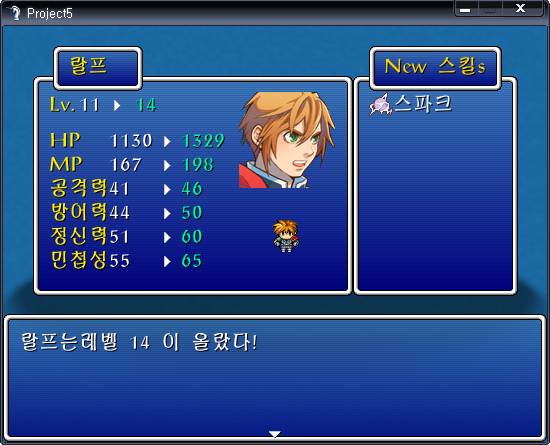

 level_up_arrow.zip
 Project5.exe
module LevelUpDisplayConfig
#--------------------------------------------------------------------------
# * General Configuration Options
#--------------------------------------------------------------------------
#The windowskin file name, minus the extension
WINDOWSKIN_NAME = 'Window'
#The sound effect name that is played when the window is displayed
LEVEL_UP_SE = 'Recovery'
#The sound effect volume
LEVEL_UP_SE_VOLUME = 80
#Display the skill window?
USE_SKILL_WINDOW = true
#The title text used in the "New Skills" window (if not nil)
#For example, NEW_SKILL_TITLE_TEXT = 'Abilities'
NEW_SKILL_TITLE_TEXT = nil
#Show the actor's sprite?
USE_SPRITE_GRAPHIC = true
#Opacity of the main window
WINDOW_OPACITY = 255
#--------------------------------------------------------------------------
# * Stat Window Configuration
#--------------------------------------------------------------------------
#The color of the actor's name in the window (gold by default)
NAME_COLOR = Color.new(255,235,0)
#The color of the actor's level in the window (gold by default)
LEVEL_COLOR = Color.new(255,235,0)
#The color of the actor's stat names in the window (gold by default)
STAT_COLOR = Color.new(255,235,0)
#The color of the actor's old stat values (white by default)
OLD_STAT_COLOR = Color.new(255,255,255)
#The color of the actor's new stat values, if a net gain (green by default)
NEW_STAT_VAL_COLOR = Color.new(0,250,154)
#The color of the actor's new stat values, if a net loss (red by default)
STAT_VAL_LOSS_COLOR = Color.new(255, 0, 0)
#--------------------------------------------------------------------------
# * Skill Window Configuration
#--------------------------------------------------------------------------
#The color of the text in the skills title window
SKILL_TITLE_COLOR = Color.new(255,215,0)
#The color of the new skills text in the skills window
SKILL_WINDOW_FONT_COLOR = Color.new(240,248,255)
#--------------------------------------------------------------------------
# * There is no need to modify the constants below
#--------------------------------------------------------------------------
STAT_WINDOW_WIDTH = 320
SKILL_WINDOW_WIDTH = 165
WINDOW_HEIGHT = 220
SUB_WINDOW_HEIGHT = 45
end
#==========================================================================
# * Game_Actor
#--------------------------------------------------------------------------
# overrides -
# * display_level_up (if DISPLAY_DEF_MESSAGE is set to false in config)
#==========================================================================
include LevelUpDisplayConfig
class Game_Actor < Game_Battler
attr_reader :last_level
attr_reader :last_hp
attr_reader :last_mp
attr_reader :last_atk
attr_reader :last_def
attr_reader :last_spi
attr_reader :last_agi
attr_reader :last_learned_skills
#--------------------------------------------------------------------------
# * Change Experience
# exp : New experience
# show : Level up display flag
#--------------------------------------------------------------------------
alias :eds_old_change_exp :change_exp
def change_exp(exp, show)
#save off the old paramters
prev_skills = skills
@last_level = @level
@last_hp = self.base_maxhp
@last_mp = self.base_maxmp
@last_atk = self.base_atk
@last_def = self.base_def
@last_spi = self.base_spi
@last_agi = self.base_agi
eds_old_change_exp(exp, show)
@last_learned_skills = skills - prev_skills
end
if USE_SKILL_WINDOW
#--------------------------------------------------------------------------
# * Show Level Up Message
# new_skills : Array of newly learned skills
#--------------------------------------------------------------------------
# If we are not displaying the standard message when
# gaining a level, simply remove the loop that creates
# the learned skills message. Continue to display
# the skills that were learned if we are not in battle.
#--------------------------------------------------------------------------
alias :eds_old_display_level_up :display_level_up
def display_level_up(new_skills)
if $game_temp.in_battle
$game_message.new_page
text = sprintf(Vocab::LevelUp, @name, Vocab::level, @level)
$game_message.texts.push(text)
else
eds_old_display_level_up(new_skills)
end
end
end #skill window check
end
#==========================================================================
# * Window_LevelUpdate
#--------------------------------------------------------------------------
# The main window that appears in battle when a level is gained.
# Displays stat info, faceset, and (optionally) the actor sprite.
#==========================================================================
class Window_LevelUpdate < Window_Base
def initialize(actor)
w = STAT_WINDOW_WIDTH
h = WINDOW_HEIGHT
if USE_SKILL_WINDOW
super(272 - (w / 2) - (SKILL_WINDOW_WIDTH / 2), 50, w, h)
else
super(272 - (w / 2), 50, w, h)
end
self.windowskin = Cache.system(WINDOWSKIN_NAME)
self.back_opacity = WINDOW_OPACITY
self.z = 9997
@actor = actor
@animation_index = 0
@arrow = Cache.picture('level_up_arrow')
@y_offset = 12 #give some room under level display
#begin drawing new level and old stat text
@col_one_offset = 0
#Draw old stats
@col_two_offset = @col_one_offset + 60
#begin drawing Faceset/sprite and skills gained
@col_four_offset = 0
#begin drawing Faceset/sprite graphics
@col_five_offset = 190
#play the sound effect
RPG::SE.new(LEVEL_UP_SE, LEVEL_UP_SE_VOLUME).play
#calculates the offet for drawing level info
calc_level_offsets
setup_name_window
draw_stat_names
draw_old_stat_values
draw_arrows
draw_new_stat_values
draw_actor_rep
update
end
#--------------------------------------------------------------------------
# * Create and display the name window
#--------------------------------------------------------------------------
def setup_name_window
@name_window = Window_Base.new(self.x + 20, self.y - 30 , fit_to_text(@actor.name), SUB_WINDOW_HEIGHT)
@name_window.z = 9998
@name_window.windowskin = Cache.system(WINDOWSKIN_NAME)
@name_window.back_opacity = 255
@name_sprite = Sprite.new
@name_sprite.bitmap = Bitmap.new(@name_window.width, @name_window.height)
@name_sprite.bitmap.font.color = NAME_COLOR
@name_sprite.x = @name_window.x + 15
@name_sprite.y = @name_window.y - 10
@name_sprite.z = 9999
@name_sprite.bitmap.draw_text(0, 0, @name_sprite.bitmap.width, 60, @actor.name)
end
#--------------------------------------------------------------------------
# * Draws the level and stat text (not the values themselves)
#--------------------------------------------------------------------------
def draw_stat_names
self.contents.font.color = LEVEL_COLOR
self.contents.draw_text(@col_one_offset, 0, 60, WLH, "Lv.")
self.contents.font.color = STAT_COLOR
self.contents.draw_text(@col_one_offset, y_incr, 60, WLH, Vocab.hp)
self.contents.draw_text(@col_one_offset, y_incr, 60, WLH, Vocab.mp)
self.contents.draw_text(@col_one_offset, y_incr, 60, WLH, Vocab.atk)
self.contents.draw_text(@col_one_offset, y_incr, 60, WLH, Vocab.def)
self.contents.draw_text(@col_one_offset, y_incr, 60, WLH, Vocab.spi)
self.contents.draw_text(@col_one_offset, y_incr, 60, WLH, Vocab.agi)
#reset the font color
self.contents.font.color = Font.default_color
#reset the y_offset to 12
y_incr_reset
end
#--------------------------------------------------------------------------
# * Draws the old level and stat values
#--------------------------------------------------------------------------
def draw_old_stat_values
self.contents.font.color = OLD_STAT_COLOR
self.contents.draw_text(@col_level_old_offset, 0, 60, WLH, @actor.last_level)
self.contents.draw_text(@col_two_offset, y_incr, 60, WLH, @actor.last_hp)
self.contents.draw_text(@col_two_offset, y_incr, 60, WLH, @actor.last_mp)
self.contents.draw_text(@col_two_offset, y_incr, 60, WLH, @actor.last_atk)
self.contents.draw_text(@col_two_offset, y_incr, 60, WLH, @actor.last_def)
self.contents.draw_text(@col_two_offset, y_incr, 60, WLH, @actor.last_spi)
self.contents.draw_text(@col_two_offset, y_incr, 60, WLH, @actor.last_agi)
#reset the font color
self.contents.font.color = Font.default_color
#reset the y_offset to 12
y_incr_reset
end
#--------------------------------------------------------------------------
# * Draws the arrows
#--------------------------------------------------------------------------
def draw_arrows
if @actor.last_hp - 100 < 0
@col_three_offset = @col_two_offset + 30
elsif @actor.last_hp - 1000 < 0
@col_three_offset = @col_two_offset + 40
else
@col_three_offset = @col_two_offset + 50
end
draw_arrow(@col_level_arrow_offset, 6) #level
draw_arrow(@col_three_offset, y_incr + 6) #hp
draw_arrow(@col_three_offset, y_incr + 6) #mp
draw_arrow(@col_three_offset, y_incr + 6) #atk
draw_arrow(@col_three_offset, y_incr + 6) #def
draw_arrow(@col_three_offset, y_incr + 6) #spi
draw_arrow(@col_three_offset, y_incr + 6) #agi
calc_col_four_offset(@col_three_offset)
#reset the y_offset to 12
y_incr_reset
end
#--------------------------------------------------------------------------
# * Draws the new level and stat values
#--------------------------------------------------------------------------
def draw_new_stat_values
draw_new_stat(@col_level_new_offset, 0, 60, WLH, @actor.last_level, @actor.level)
draw_new_stat(@col_four_offset, y_incr, 60, WLH, @actor.last_hp, @actor.maxhp)
draw_new_stat(@col_four_offset, y_incr, 60, WLH, @actor.last_mp, @actor.maxmp)
draw_new_stat(@col_four_offset, y_incr, 60, WLH, @actor.last_atk, @actor.base_atk)
draw_new_stat(@col_four_offset, y_incr, 60, WLH, @actor.last_def, @actor.base_def)
draw_new_stat(@col_four_offset, y_incr, 60, WLH, @actor.last_spi, @actor.base_spi)
draw_new_stat(@col_four_offset, y_incr, 60, WLH, @actor.last_agi, @actor.base_agi)
self.contents.font.color = Font.default_color
#reset the y_offset to 12
y_incr_reset
end
def draw_new_stat(x, y, w, h, prev_val, val)
if val > prev_val #gain
self.contents.font.color = NEW_STAT_VAL_COLOR
elsif val == prev_val #no change
self.contents.font.color = OLD_STAT_COLOR
else #loss
self.contents.font.color = STAT_VAL_LOSS_COLOR
end
self.contents.draw_text(x, y, w, h, val)
end
#--------------------------------------------------------------------------
# * Draws the faceset and optionally the actor sprite
#--------------------------------------------------------------------------
def draw_actor_rep
draw_actor_face(@actor, @col_five_offset, 0)
if (USE_SPRITE_GRAPHIC)
x_pos = @col_five_offset + ((self.width - @col_five_offset) / 2) - 18
draw_character(@actor.character_name, @actor.character_index, x_pos, 160)
end
end
#--------------------------------------------------------------------------
# * Draws an arrow
#--------------------------------------------------------------------------
def draw_arrow(x, y)
src_rect = Rect.new(0, 0, @arrow.width, @arrow.height)
self.contents.blt(x, y, @arrow, src_rect)
end
#--------------------------------------------------------------------------
# * figures out the spacing for the level text display
#--------------------------------------------------------------------------
def calc_level_offsets
@col_level_old_offset = @col_one_offset + 30
if @actor.last_level < 10
@col_level_arrow_offset = @col_level_old_offset + 20
else
@col_level_arrow_offset = @col_level_old_offset + 30
end
@col_level_new_offset = @col_level_arrow_offset + 26
end
#--------------------------------------------------------------------------
# * Increments the y counter
#--------------------------------------------------------------------------
def y_incr
@y_offset += WLH
return @y_offset
end
#--------------------------------------------------------------------------
# * Resets the y counter
#--------------------------------------------------------------------------
def y_incr_reset
@y_offset = 12
end
#--------------------------------------------------------------------------
# * calculate where to draw col four text (new stat values)
#--------------------------------------------------------------------------
def calc_col_four_offset(col_three)
@col_four_offset = col_three + 22
end
#--------------------------------------------------------------------------
# * Fit the window width to the text
#--------------------------------------------------------------------------
def fit_to_text(text)
w = self.contents.text_size(text).width + 32
return w > 90 ? w : 90
end
#--------------------------------------------------------------------------
# * Update the child window position
#--------------------------------------------------------------------------
def update_child_window_pos
@name_window.x = self.x + 20
@name_window.y = self.y - 30
@name_sprite.x = @name_window.x + 15
@name_sprite.y = @name_window.y - 10
end
#--------------------------------------------------------------------------
# * Destroy the sprite!
#--------------------------------------------------------------------------
def dispose
super
@name_window.dispose
@name_sprite.dispose
end
end
#============================================================================
# * Window_SkillUpdate
#----------------------------------------------------------------------------
# The learned skill window
#============================================================================
class Window_SkillUpdate < Window_Base
def initialize(actor, parent_x, parent_y, parent_width)
x = parent_x + parent_width
h = WINDOW_HEIGHT
w = SKILL_WINDOW_WIDTH
super(x, parent_y, w, h)
self.windowskin = Cache.system(WINDOWSKIN_NAME)
self.back_opacity = WINDOW_OPACITY
self.contents.font.color = SKILL_WINDOW_FONT_COLOR
self.z = 9997
@actor = actor
@skills = []
setup_title_window
populate_skill_list
end
#--------------------------------------------------------------------------
# * create the title window
#--------------------------------------------------------------------------
def setup_title_window
#check to see if custom text is defined
if NEW_SKILL_TITLE_TEXT == nil
skill_title_text = sprintf("New %ss", Vocab.skill)
else
skill_title_text = NEW_SKILL_TITLE_TEXT
end
middle_parent = self.x + (self.width / 2)
w = fit_to_text(skill_title_text)
h = SUB_WINDOW_HEIGHT
x = middle_parent - (w / 2)
y = self.y - 30
@title_window = Window_Base.new(x, y, w, h)
@title_window.z = 9998
@title_window.windowskin = Cache.system(WINDOWSKIN_NAME)
@title_window.back_opacity = 255
@title_sprite = Sprite.new
@title_sprite.bitmap = Bitmap.new(@title_window.width, @title_window.height)
@title_sprite.bitmap.font.color = SKILL_TITLE_COLOR
@title_sprite.x = @title_window.x + 15
@title_sprite.y = @title_window.y + 4
@title_sprite.z = 9999
@title_sprite.bitmap.draw_text(0, 0, @title_sprite.bitmap.width, 32, skill_title_text)
end
#--------------------------------------------------------------------------
# * My edit of draw_item_name.
# Necessary because the default one changes the font color.
#--------------------------------------------------------------------------
def draw_my_item_name(item, x, y, enabled = true)
if item != nil
draw_icon(item.icon_index, x, y, enabled)
self.contents.font.color.alpha = enabled ? 255 : 128
self.contents.draw_text(x + 24, y, 172, WLH, item.name)
end
end
#--------------------------------------------------------------------------
# * draw all of the skills that were learned
#--------------------------------------------------------------------------
def populate_skill_list
skills = @actor.last_learned_skills
y = 0
for skill in skills
draw_my_item_name(skill, 0, y)
y += 32
end
end
#--------------------------------------------------------------------------
# * Fit the window width to the text
#--------------------------------------------------------------------------
def fit_to_text(text)
return self.contents.text_size(text).width + 32
end
#--------------------------------------------------------------------------
# * Kill the sprite!
#--------------------------------------------------------------------------
alias :eds_old_dispose :dispose
def dispose
eds_old_dispose
@title_window.dispose
@title_sprite.dispose
end
end
#============================================================================
# * Scene_Battle
#----------------------------------------------------------------------------
# overrides -
# * display_level_up
#============================================================================
class Scene_Battle < Scene_Base
#--------------------------------------------------------------------------
# * Display Level Up
#--------------------------------------------------------------------------
def display_level_up
#patch for KGC Equip Learn Skill script
if $imported != nil and $imported["EquipLearnSkill"]
display_master_equipment_skill
end
exp = $game_troop.exp_total
for actor in $game_party.existing_members
last_level = actor.level
last_skills = actor.skills
actor.gain_exp(exp, true)
if actor.level > last_level
win = Window_LevelUpdate.new(actor)
#if we are using the skill window and the skills have changed...
if USE_SKILL_WINDOW && last_skills.length != actor.skills.length
s_win = Window_SkillUpdate.new(actor, win.x, win.y, win.width)
wait_for_message
s_win.dispose if USE_SKILL_WINDOW
else
#move the window back to center screen and update the name window
win.x = 272 - (win.width / 2)
win.update_child_window_pos
wait_for_message
end
win.dispose
end
end
end
end

.gif) 좋은데쓰일꺼에요 (?)
좋은데쓰일꺼에요 (?)