
Created by: AmIMeYet
Version: 1.1
Updates: Come back to this topic and see if the version number changed!
Creator's Website: AmIMeYet.nl.tp
Information:
With this script you can show maps (or other images) with titles.
It sound's quite lame but it's actually quite handy!
With this system you can make item's (or skills, or scripts) that basically show a map.
It uses images (you have to create) and displays it on the screen.
The reason that I made this script is that I wanted to show a map on the screen, but it would't dissapear with button input.
Readme:
Put the script under the 'materials' section in the script editor.
For usage and costumization instructions, see the script.
Screenshots:
Screeshots with comments!
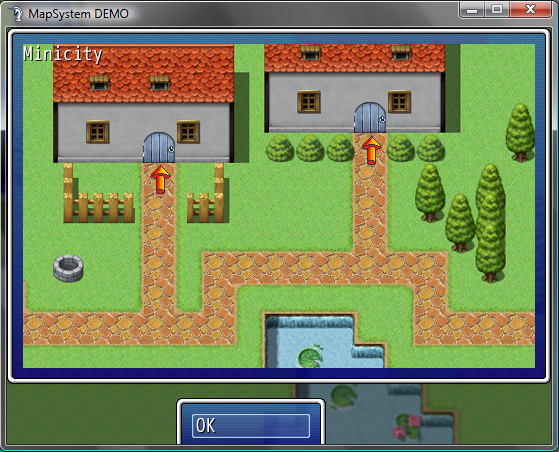
MiniCity map
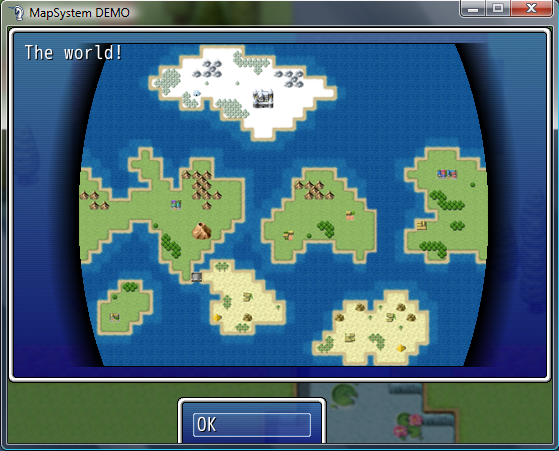
World Map (Note: I made the 'globe' effect myself, including the black glow.. this is not produced by the script...)
시작
################################################################################
################# Map-System by AmIMeYet ###############
#------------------------------------------------------------------------------#
# Created by: AmIMeYet
# Version: 1.1
# Updates: Check the website where you downloaded this script.
# Creator's Website: amimeyet.nl.tp
#------------------------------------------------------------------------------#
### READ FIRST -- INFO ###
=begin
This map system is used to display maps, or other images on the screen.
Below is the "DECLATATIONS" part, there you must fill in your preferred text,
plus your image names.
The image files should be 513 x 324 in size. (513 X [width], and 324 Y [hight])
You should put the images in the /system/ folder...
Ofcourse you can edit Map1 and Map2, and add more maps!
Even if you do not wish to use map2 etc. you do not have to remove it.
-How do I add more maps?
go to line 27
-How do I call the map screen and make it display my map?
go to line 40
-How do I edit the 'ok'-button text?
go to line 56
### HOW TO ADD MORE MAPS ###
First, you must add a new entry to the 'DECLARATIONS'.
After the other declarations, add:
$Map<NUMBER> = "<MAP NAME>"
$Map<NUMBER>IMG = "<IMAGE NAME>"
#Replace <NUMBER> with the incremental number (+1).
#Replace <MAP NAME> with the name you want to display at the top-left corner.
#Replace <IMAGE NAME> with the same name as the image you want (excluding extension).
EXAMPLE: $Map3 = "My cool name for map 3!"
$Map3IMG = "map3image"
### HOW TO CALL THE MAP'S ###
Create and event/common event and on page 3 of event commands select 'script'
Then, make it call:
$MapSystemMap = $Map<NUMBER>
$MapSystemIMG = $Map<NUMBER>IMG
$scene = Scene_MapSystem.new
#Replace <NUMBER> with the number of your map and image..
EXAMPLE: $MapSystemMap = $Map1
$MapSystemIMG = $Map1IMG
$scene = Scene_MapSystem.new
Ofcourse you can also make a script in the script editor that call's that code,
if you like.
### HOW TO EDIT THE OK BUTTON TEXT ###
Go to 'Create Command Window' below (aproximately line 128 or more, depending on how many
map you have added).
Then change the text after 's1 = ' into something you like,
keeping the double quotes.
ORIGINAL: s1 = "OK" (so you can press ctlr + f to search for it )
)
EXAMPLE: s1 = "Go back"
Please note that not all text will fit in the small window at the bottom.
ADVANCED USERS: you have to manually alter the size and XY of that box(line 115)
###
If you have any questions,
please post them in the topic where you found my script.
=end
#######
############################## SCENE CLASS ####################################
## THIS MANAGES CLASS THAT DISPLAYS THE WINDOW + BUTTONS ##
###############################################################################
class Scene_MapSystem < Scene_Base
###################### DECLARATIONS ######################
$Map1 = "The world!" #Name of the first map
$Map1IMG = "map1" #Image of the first map
$Map2 = "Minicity" #Name of the second map
$Map2IMG = "map2" #Image of the second map
#################### END DECLARATIONS ####################
$MapSystemMap = "" #Clear MapSystemMap
$MapSysetmIMG = "" #Clear MapSystemIMG
#--------------------------------------------------------------------------
# * Start processing
#--------------------------------------------------------------------------
def start
super
create_menu_background
create_command_window
@map_window = Window_MapSystem.new(0, 0)
end
#--------------------------------------------------------------------------
# * Termination Processing
#--------------------------------------------------------------------------
def terminate
super
dispose_menu_background
dispose_command_window
@map_window.dispose
end
#--------------------------------------------------------------------------
# * Frame Update
#--------------------------------------------------------------------------
def update
super
update_menu_background
@command_window.update
@map_window.update
if @command_window.active
update_command_selection
update_map_window
elsif @map_window.active
update_map_window
end
end
#--------------------------------------------------------------------------
# * Create Command Window
#--------------------------------------------------------------------------
def create_command_window
s1 = "OK"
@command_window = Window_Command.new(150, [s1], 1)
@command_window.y = 370
@command_window.x = 169
end
#--------------------------------------------------------------------------
# * Dispose of Command Window
#--------------------------------------------------------------------------
def dispose_command_window
@command_window.dispose
end
#--------------------------------------------------------------------------
# * Update Command Selection
#--------------------------------------------------------------------------
def update_command_selection
if Input.trigger?(Input::
Sound.play_cancel
$scene = Scene_Map.new
elsif Input.trigger?(Input::C)
case @command_window.index
when 0 #terug
Sound.play_decision
$scene = Scene_Map.new
end
end
end
#--------------------------------------------------------------------------
# * Update Buy Item Selection
#--------------------------------------------------------------------------
def update_map_window
if Input.trigger?(Input::
Sound.play_cancel
@command_window.active = true
@map_window.active = false
@map_window.visible = false
return
end
end
end
############################## WINDOW CLASS ###################################
## THIS MANAGES THE WINDOW, DISPLAYED INSIDE THE SCENE CLASS ##
###############################################################################
class Window_MapSystem < Window_Base
#--------------------------------------------------------------------------
# * Object Initialization
# x : window X coordinate
# y : window Y coordinate
#--------------------------------------------------------------------------
def initialize(x, y)
super(x, y, 544, 356)
refresh
end
#--------------------------------------------------------------------------
# * Refresh
#--------------------------------------------------------------------------
def nd_mapic
mapic = Cache.system("")
end
def refresh
self.contents.clear
mapic = Cache.system($MapSystemIMG) rescue nd_mapic #sets map IMG
cw = mapic.width
ch = mapic.height
src_rect = Rect.new(0, 0, cw, ch)
self.contents.blt(0 , 0, mapic, src_rect)
self.contents.draw_text(0, 0, 400, 20, $MapSystemMap, 0) #Displays the map name
end
end
Version: 1.1
Updates: Come back to this topic and see if the version number changed!
Creator's Website: AmIMeYet.nl.tp
Information:
With this script you can show maps (or other images) with titles.
It sound's quite lame but it's actually quite handy!
With this system you can make item's (or skills, or scripts) that basically show a map.
It uses images (you have to create) and displays it on the screen.
The reason that I made this script is that I wanted to show a map on the screen, but it would't dissapear with button input.
Readme:
Put the script under the 'materials' section in the script editor.
For usage and costumization instructions, see the script.
Screenshots:
Screeshots with comments!
[Show/Hide] screenshots (2)
MiniCity map
World Map (Note: I made the 'globe' effect myself, including the black glow.. this is not produced by the script...)
################################################################################
################# Map-System by AmIMeYet ###############
#------------------------------------------------------------------------------#
# Created by: AmIMeYet
# Version: 1.1
# Updates: Check the website where you downloaded this script.
# Creator's Website: amimeyet.nl.tp
#------------------------------------------------------------------------------#
### READ FIRST -- INFO ###
=begin
This map system is used to display maps, or other images on the screen.
Below is the "DECLATATIONS" part, there you must fill in your preferred text,
plus your image names.
The image files should be 513 x 324 in size. (513 X [width], and 324 Y [hight])
You should put the images in the /system/ folder...
Ofcourse you can edit Map1 and Map2, and add more maps!
Even if you do not wish to use map2 etc. you do not have to remove it.
-How do I add more maps?
go to line 27
-How do I call the map screen and make it display my map?
go to line 40
-How do I edit the 'ok'-button text?
go to line 56
### HOW TO ADD MORE MAPS ###
First, you must add a new entry to the 'DECLARATIONS'.
After the other declarations, add:
$Map<NUMBER> = "<MAP NAME>"
$Map<NUMBER>IMG = "<IMAGE NAME>"
#Replace <NUMBER> with the incremental number (+1).
#Replace <MAP NAME> with the name you want to display at the top-left corner.
#Replace <IMAGE NAME> with the same name as the image you want (excluding extension).
EXAMPLE: $Map3 = "My cool name for map 3!"
$Map3IMG = "map3image"
### HOW TO CALL THE MAP'S ###
Create and event/common event and on page 3 of event commands select 'script'
Then, make it call:
$MapSystemMap = $Map<NUMBER>
$MapSystemIMG = $Map<NUMBER>IMG
$scene = Scene_MapSystem.new
#Replace <NUMBER> with the number of your map and image..
EXAMPLE: $MapSystemMap = $Map1
$MapSystemIMG = $Map1IMG
$scene = Scene_MapSystem.new
Ofcourse you can also make a script in the script editor that call's that code,
if you like.
### HOW TO EDIT THE OK BUTTON TEXT ###
Go to 'Create Command Window' below (aproximately line 128 or more, depending on how many
map you have added).
Then change the text after 's1 = ' into something you like,
keeping the double quotes.
ORIGINAL: s1 = "OK" (so you can press ctlr + f to search for it
)EXAMPLE: s1 = "Go back"
Please note that not all text will fit in the small window at the bottom.
ADVANCED USERS: you have to manually alter the size and XY of that box(line 115)
###
If you have any questions,
please post them in the topic where you found my script.
=end
#######
############################## SCENE CLASS ####################################
## THIS MANAGES CLASS THAT DISPLAYS THE WINDOW + BUTTONS ##
###############################################################################
class Scene_MapSystem < Scene_Base
###################### DECLARATIONS ######################
$Map1 = "The world!" #Name of the first map
$Map1IMG = "map1" #Image of the first map
$Map2 = "Minicity" #Name of the second map
$Map2IMG = "map2" #Image of the second map
#################### END DECLARATIONS ####################
$MapSystemMap = "" #Clear MapSystemMap
$MapSysetmIMG = "" #Clear MapSystemIMG
#--------------------------------------------------------------------------
# * Start processing
#--------------------------------------------------------------------------
def start
super
create_menu_background
create_command_window
@map_window = Window_MapSystem.new(0, 0)
end
#--------------------------------------------------------------------------
# * Termination Processing
#--------------------------------------------------------------------------
def terminate
super
dispose_menu_background
dispose_command_window
@map_window.dispose
end
#--------------------------------------------------------------------------
# * Frame Update
#--------------------------------------------------------------------------
def update
super
update_menu_background
@command_window.update
@map_window.update
if @command_window.active
update_command_selection
update_map_window
elsif @map_window.active
update_map_window
end
end
#--------------------------------------------------------------------------
# * Create Command Window
#--------------------------------------------------------------------------
def create_command_window
s1 = "OK"
@command_window = Window_Command.new(150, [s1], 1)
@command_window.y = 370
@command_window.x = 169
end
#--------------------------------------------------------------------------
# * Dispose of Command Window
#--------------------------------------------------------------------------
def dispose_command_window
@command_window.dispose
end
#--------------------------------------------------------------------------
# * Update Command Selection
#--------------------------------------------------------------------------
def update_command_selection
if Input.trigger?(Input::
Sound.play_cancel
$scene = Scene_Map.new
elsif Input.trigger?(Input::C)
case @command_window.index
when 0 #terug
Sound.play_decision
$scene = Scene_Map.new
end
end
end
#--------------------------------------------------------------------------
# * Update Buy Item Selection
#--------------------------------------------------------------------------
def update_map_window
if Input.trigger?(Input::
Sound.play_cancel
@command_window.active = true
@map_window.active = false
@map_window.visible = false
return
end
end
end
############################## WINDOW CLASS ###################################
## THIS MANAGES THE WINDOW, DISPLAYED INSIDE THE SCENE CLASS ##
###############################################################################
class Window_MapSystem < Window_Base
#--------------------------------------------------------------------------
# * Object Initialization
# x : window X coordinate
# y : window Y coordinate
#--------------------------------------------------------------------------
def initialize(x, y)
super(x, y, 544, 356)
refresh
end
#--------------------------------------------------------------------------
# * Refresh
#--------------------------------------------------------------------------
def nd_mapic
mapic = Cache.system("")
end
def refresh
self.contents.clear
mapic = Cache.system($MapSystemIMG) rescue nd_mapic #sets map IMG
cw = mapic.width
ch = mapic.height
src_rect = Rect.new(0, 0, cw, ch)
self.contents.blt(0 , 0, mapic, src_rect)
self.contents.draw_text(0, 0, 400, 20, $MapSystemMap, 0) #Displays the map name
end
end
