Avangs

  • 게임 정보
    • 게임 소개
    • 게임 리뷰
    • 게임 실황
    • 게임 공략
    • 모바일 테스트
  • 게임 작품new
    • 완성작 게임
    • 체험판 게임
    • 한글판 게임new
    • 온라인 게임
    • 추천작 제작자 저장소
  • 투표선정 작품
    • 아방스 추천작
    • 완성 기대작
    • 투표 신청
    • 투표소
    • 투표 결과
  • 강좌
    • 아방스 칼럼
    • 비주얼노벨 강좌
    • 알만툴 강좌
      • MZ 강좌
      • MV 강좌
      • VX Ace 강좌
      • VX 강좌
      • XP 강좌
      • 2003 강좌
      • 2000 강좌
    • 게임메이커 강좌
    • 울프툴 강좌
    • 3D 게임제작 강좌
    • 2D 게임제작 강좌
    • 그래픽 제작 강좌
    • 기타 강좌
  • 질문과 답변
    • 자주 묻는 질문
    • 질문과 답변
    • 제작의뢰
  • 커뮤니티
    • 구인·구직·외주
    • 테스트 요청
    • 자유게시판
    • 게임계 소식
    • 유머&정보
    • 사이트링크
    • 이벤트&대회
  • 창작
    • 게임 기획
    • 맵배치
    • 글쓰기
    • 그리기
    • 음악
  • 자료실
    • 게임제작툴
    • 예제 및 샘플
    • 그래픽 소재
      • 오리지널 소재
      • 이차창작 소재
      • 수정·개조 소재
      • 외부 소재
    • 사운드 소재
    • 확장·플러그인·스크립트
      • MZ 플러그인
      • MV 플러그인
      • Ace 스크립트
      • VX 스크립트
      • XP 스크립트
      • 2k3 플러그인
      • VN 플러그인·확장
    • 외부 소재사이트
    • 기타 자료
      • 한글화툴
      • 무료 폰트
      • 유틸리티
    • 디자인 참고자료
  • 고객센터
    • 공지사항
    • 건의 및 신고
    • 핫 이슈
로그인 회원가입
Avangs
  • 게임 정보
    • 게임 소개
    • 게임 리뷰
    • 게임 실황
    • 게임 공략
    • 모바일 테스트
  • 게임 작품new
    • 완성작 게임
    • 체험판 게임
    • 한글판 게임new
    • 온라인 게임
    • 추천작 제작자 저장소
  • 투표선정 작품
    • 아방스 추천작
    • 완성 기대작
    • 투표 신청
    • 투표소
    • 투표 결과
  • 강좌
    • 아방스 칼럼
    • 비주얼노벨 강좌
    • 알만툴 강좌
      • MZ 강좌
      • MV 강좌
      • VX Ace 강좌
      • VX 강좌
      • XP 강좌
      • 2003 강좌
      • 2000 강좌
    • 게임메이커 강좌
    • 울프툴 강좌
    • 3D 게임제작 강좌
    • 2D 게임제작 강좌
    • 그래픽 제작 강좌
    • 기타 강좌
  • 질문과 답변
    • 자주 묻는 질문
    • 질문과 답변
    • 제작의뢰
  • 커뮤니티
    • 구인·구직·외주
    • 테스트 요청
    • 자유게시판
    • 게임계 소식
    • 유머&정보
    • 사이트링크
    • 이벤트&대회
  • 창작
    • 게임 기획
    • 맵배치
    • 글쓰기
    • 그리기
    • 음악
  • 자료실
    • 게임제작툴
    • 예제 및 샘플
    • 그래픽 소재
      • 오리지널 소재
      • 이차창작 소재
      • 수정·개조 소재
      • 외부 소재
    • 사운드 소재
    • 확장·플러그인·스크립트
      • MZ 플러그인
      • MV 플러그인
      • Ace 스크립트
      • VX 스크립트
      • XP 스크립트
      • 2k3 플러그인
      • VN 플러그인·확장
    • 외부 소재사이트
    • 기타 자료
      • 한글화툴
      • 무료 폰트
      • 유틸리티
    • 디자인 참고자료
  • 고객센터
    • 공지사항
    • 건의 및 신고
    • 핫 이슈
로그인 회원가입

NOTICE

공지사항
더보기
  • 서버 안정성 및 보안 강화 조치 04.20

Recently Added Games

최근 등록 게임
  • 어드벤쳐 고철에 파묻힌 데모나 (屑鉄まとうデモナ) newfile 08.19
  • 어드벤쳐 비올레 저택의 시온 : 꽃눈의 저택|RPG Maker MZ 단편 심리공포 어드벤처 file 08.17
  • 기타 (똥 주의)그저 똥을 누러 가는 게임 Re:Boot updatefile 08.16
  • 롤플레잉 SACCHARINE SYNC (DEMO) 배포 file 08.12
  • 기타 (완성작) 야구장에 가자4 file 2 07.07
메뉴
2013.04.18 23:19

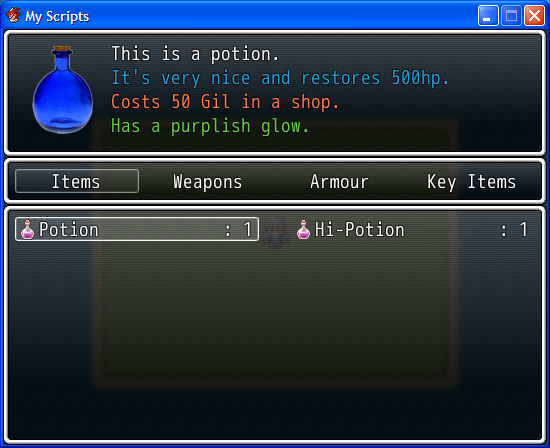
아이템 설명 메뉴 스크립트 (Crazyninjaguy)

IZEN
조회 수 5236 추천 수 1 댓글 2
크게 작게 위로 아래로 댓글로 가기 인쇄 첨부

43cdcdd59fc0376d6cd671872a8c0fef.png


http://www.rpgmakervxace.net/topic/654-see-item-menu-ace/


아이템 설명을 두 줄 이상을 어떻게 넣을까 고민하다가 찾았습니다

스크립트에 아이템 설명을 쓰시고 데이터베이스-아이템-메모 에다가 아래 스크립트를 집어넣으시면 됩니다


$imported = {} if $imported == nil
$imported["SEE - Item Menu Ace"] = true

1 추천 0 비추천
Atachment
첨부 '1'
  • 990484.png,
Facebook Twitter Google Pinterest KakaoStory Band
위로 아래로 댓글로 가기 인쇄 첨부
에디터 선택하기
✔ 텍스트 모드 ✔ 에디터 모드
?
댓글 쓰기 권한이 없습니다. 로그인 하시겠습니까?
Comments '2'
  • profile
    여긴어딘가난또누군가 2013.06.07 21:44
    노가다가 살짝 보이네요.
    댓글
  • profile
    아방스 2024.07.23 09:51
    원본 링크가 접속되지 않아 스크립트를 남겨봅니다.


    #===============================================================================
    # * SEE - Item Menu ACE# * SEE - Item Menu ACE
    # * By Crazyninjaguy# * By Crazyninjaguy
    # * Requested by BizarreMonkey# * Requested by BizarreMonkey
    # * http://www.stormxstudios.co.uk# * http://www.stormxstudios.co.uk
    # * 02/01/2012# * 02/01/2012
    # * If you like my scripts, please show your appreciation by checking out# * If you like my scripts, please show your appreciation by checking out
    # my friendly, helpful Game Development Community, StormCross Studios.# my friendly, helpful Game Development Community, StormCross Studios.
    # ---------------------------------------------------------------------------# ---------------------------------------------------------------------------
    # * Aliased Methods# * Aliased Methods
    # - start (Scene_Item)# - start (Scene_Item)
    # - update_item_selection (Scene_Item)# - update_item_selection (Scene_Item)
    # - terminate (Scene_Item)# - terminate (Scene_Item)
    # ---------------------------------------------------------------------------# ---------------------------------------------------------------------------
    # * This script adds a new item description window with support for four text# * This script adds a new item description window with support for four text
    # text lines and a 96 x 96 picture in Graphics/Pictures.# text lines and a 96 x 96 picture in Graphics/Pictures.
    # * To add a picture for your item, add this into the notebox of that item in# * To add a picture for your item, add this into the notebox of that item in
    # the database# the database
    # * <picture potionpicture># * <picture potionpicture>
    # * Replacing potionpicture for your image filename.# * Replacing potionpicture for your image filename.
    #===============================================================================#===============================================================================

    $imported = {} if $imported == nil= {} if $imported == nil
    $imported["SEE - Item Menu Ace"] = true["SEE - Item Menu Ace"] = true

    #===============================================================================#===============================================================================
    # * Main StormCross Engine Evolution Configuration Module# * Main StormCross Engine Evolution Configuration Module
    #===============================================================================#===============================================================================
    module SEEmodule SEE
    #=============================================================================#=============================================================================
    # * Item Menu Configuration Module# * Item Menu Configuration Module
    #=============================================================================#=============================================================================
    module Itemmodule Item
    ITEMS = []= []
    #===========================================================================#===========================================================================
    # * The number at the beginning of the ITEMS[1] is the item id in the# * The number at the beginning of the ITEMS[1] is the item id in the
    # database.# database.
    # * Each line of text in quotes is a seperate line in the window.# * Each line of text in quotes is a seperate line in the window.
    # Seperate each with a comma# Seperate each with a comma
    #===========================================================================#===========================================================================
    ITEMS[1] = ["This is a potion.", "It's very nice and restores 500hp.", "Costs 50 Gil in a shop.", "Has a purplish glow."][1] = ["This is a potion.", "It's very nice and restores 500hp.", "Costs 50 Gil in a shop.", "Has a purplish glow."]
    ITEMS[2] = ["This is a high potion.", "It's very nice and restores 2500hp.", "Costs 150 Gil in a shop.", "Has a purplish glow."][2] = ["This is a high potion.", "It's very nice and restores 2500hp.", "Costs 150 Gil in a shop.", "Has a purplish glow."]

    WEAPONS = []= []
    WEAPONS[1] = ["Derp", "", "", ""][1] = ["Derp", "", "", ""]

    ARMORS = []= []
    ARMORS[1] = ["", "", "", ""][1] = ["", "", "", ""]

    ITEM_COLOURS = []= []
    #===========================================================================#===========================================================================
    # * As with the previous, the number at the beginning of COLOURS[1] is the# * As with the previous, the number at the beginning of COLOURS[1] is the
    # item id in the database.# item id in the database.
    # * The numbers in the array correspond to the text_color() argument of# * The numbers in the array correspond to the text_color() argument of
    # window base. 0 is white. You can find these by looking at the# window base. 0 is white. You can find these by looking at the
    # Window.png graphic. Seperate each value with a comma.# Window.png graphic. Seperate each value with a comma.
    #===========================================================================#===========================================================================
    ITEM_COLOURS[1] = [0, 1, 2, 3][1] = [0, 1, 2, 3]

    WEAPON_COLOURS = []= []
    WEAPON_COLOURS[1] = [0, 1, 2, 3][1] = [0, 1, 2, 3]

    ARMOR_COLOURS = []= []
    ARMOR_COLOURS[1] = [0, 1, 2, 3][1] = [0, 1, 2, 3]
    end # Itemend # Item
    end # SEEend # SEE

    module ReadNotemodule ReadNote
    def read_note(note, tag, position = 1)def read_note(note, tag, position = 1)
    note2 = note.dup= note.dup
    lines = note2.scan(/<.+>/)= note2.scan(/<.+>/)
    for line in linesfor line in lines
    words = line.split(/[ <>]/)= line.split(/[ <>]/)
    words.delete("").delete("")
    for word in wordsfor word in words
    if word == tagif word == tag
    result = words[words.index(word) + position]= words[words.index(word) + position]
    return true if result == nilreturn true if result == nil
    return resultreturn result
    endend
    endend
    endend
    return falsereturn false
    endend
    endend

    class Scene_Item < Scene_ItemBaseclass Scene_Item < Scene_ItemBase
    def startdef start
    supersuper
    create_description_window
    create_category_window
    create_item_window
    @description_index = 0@description_index = 0
    endend
    def create_description_windowdef create_description_window
    @description = Window_ItemDescription.new@description = Window_ItemDescription.new
    @description.viewport = @viewport@description.viewport = @viewport
    endend
    def create_category_windowdef create_category_window
    @category_window = Window_ItemCategory.new@category_window = Window_ItemCategory.new
    @category_window.viewport = @viewport@category_window.viewport = @viewport
    @category_window.y = @description.height@category_window.y = @description.height
    @category_window.set_handler(:ok, method(:on_category_ok))@category_window.set_handler(:ok, method(:on_category_ok))
    @category_window.set_handler(:cancel, method(:return_scene))@category_window.set_handler(:cancel, method(:return_scene))
    endend
    def create_item_windowdef create_item_window
    wy = @category_window.y + @category_window.height= @category_window.y + @category_window.height
    wh = Graphics.height - wy= Graphics.height - wy
    @item_window = Window_ItemList.new(0, wy, Graphics.width, wh)@item_window = Window_ItemList.new(0, wy, Graphics.width, wh)
    @item_window.set_handler(:ok, method(:on_item_ok))@item_window.set_handler(:ok, method(:on_item_ok))
    @item_window.set_handler(:cancel, method(:on_item_cancel))@item_window.set_handler(:cancel, method(:on_item_cancel))
    @category_window.item_window = @item_window@category_window.item_window = @item_window
    @item_window.viewport = @viewport@item_window.viewport = @viewport
    endend
    def on_item_canceldef on_item_cancel
    @item_window.unselect@item_window.unselect
    @category_window.activate@category_window.activate
    @description.refresh(nil)@description.refresh(nil)
    endend
    def updatedef update
    supersuper
    if @description_index != @item_window.indexif @description_index != @item_window.index
    @description.refresh(@item_window.item)@description.refresh(@item_window.item)
    @description_index = @item_window.index@description_index = @item_window.index
    endend
    endend
    endend

    class Window_ItemDescription < Window_Baseclass Window_ItemDescription < Window_Base
    include ReadNoteReadNote
    include SEE::Item::Item
    def initialize(item = nil)def initialize(item = nil)
    super(0, 0, Graphics.width, (Graphics.height - 288))super(0, 0, Graphics.width, (Graphics.height - 288))
    refresh(item)(item)
    end # initializeend # initialize
    def refresh(item)def refresh(item)
    self.contents.clearself.contents.clear
    if item != nilif item != nil
    if item.is_a?(RPG::Item)if item.is_a?(RPG::Item)
    picture = read_note($data_items[item.id].note, "picture")= read_note($data_items[item.id].note, "picture")
    elsif item.is_a?(RPG::Weapon)elsif item.is_a?(RPG::Weapon)
    picture = read_note($data_weapons[item.id].note, "picture")= read_note($data_weapons[item.id].note, "picture")
    elsif item.is_a?(RPG::Armor)elsif item.is_a?(RPG::Armor)
    picture = read_note($data_armors[item.id].note, "picture")= read_note($data_armors[item.id].note, "picture")
    endend
    if picture != falseif picture != false
    bitmap = Cache.picture(picture)= Cache.picture(picture)
    rect = Rect.new(0, 0, 96, 96)= Rect.new(0, 0, 96, 96)
    self.contents.blt(0, 0, bitmap, rect)self.contents.blt(0, 0, bitmap, rect)
    endend
    if item.is_a?(RPG::Item)if item.is_a?(RPG::Item)
    if ITEMS[item.id] != nilif ITEMS[item.id] != nil
    if ITEM_COLOURS[item.id] != nilif ITEM_COLOURS[item.id] != nil
    self.contents.font.color = text_color(ITEM_COLOURS[item.id][0])self.contents.font.color = text_color(ITEM_COLOURS[item.id][0])
    self.contents.draw_text(96, 0, width - 128, 24, ITEMS[item.id][0])self.contents.draw_text(96, 0, width - 128, 24, ITEMS[item.id][0])
    self.contents.font.color = text_color(ITEM_COLOURS[item.id][1])self.contents.font.color = text_color(ITEM_COLOURS[item.id][1])
    self.contents.draw_text(96, 24, width - 128, 24, ITEMS[item.id][1])self.contents.draw_text(96, 24, width - 128, 24, ITEMS[item.id][1])
    self.contents.font.color = text_color(ITEM_COLOURS[item.id][2])self.contents.font.color = text_color(ITEM_COLOURS[item.id][2])
    self.contents.draw_text(96, 48, width - 128, 24, ITEMS[item.id][2])self.contents.draw_text(96, 48, width - 128, 24, ITEMS[item.id][2])
    self.contents.font.color = text_color(ITEM_COLOURS[item.id][3])self.contents.font.color = text_color(ITEM_COLOURS[item.id][3])
    self.contents.draw_text(96, 72, width - 128, 24, ITEMS[item.id][3])self.contents.draw_text(96, 72, width - 128, 24, ITEMS[item.id][3])
    self.contents.font.color = text_color(0)self.contents.font.color = text_color(0)
    elseelse
    self.contents.draw_text(96, 0, width - 128, 24, ITEMS[item.id][0])self.contents.draw_text(96, 0, width - 128, 24, ITEMS[item.id][0])
    self.contents.draw_text(96, 24, width - 128, 24, ITEMS[item.id][1])self.contents.draw_text(96, 24, width - 128, 24, ITEMS[item.id][1])
    self.contents.draw_text(96, 48, width - 128, 24, ITEMS[item.id][2])self.contents.draw_text(96, 48, width - 128, 24, ITEMS[item.id][2])
    self.contents.draw_text(96, 72, width - 128, 24, ITEMS[item.id][3])self.contents.draw_text(96, 72, width - 128, 24, ITEMS[item.id][3])
    endend
    endend
    elsif item.is_a?(RPG::Weapon)elsif item.is_a?(RPG::Weapon)
    if WEAPONS[item.id] != nilif WEAPONS[item.id] != nil
    if WEAPON_COLOURS[item.id] != nilif WEAPON_COLOURS[item.id] != nil
    self.contents.font.color = text_color(WEAPON_COLOURS[item.id][0])self.contents.font.color = text_color(WEAPON_COLOURS[item.id][0])
    self.contents.draw_text(96, 0, width - 128, 24, WEAPONS[item.id][0])self.contents.draw_text(96, 0, width - 128, 24, WEAPONS[item.id][0])
    self.contents.font.color = text_color(WEAPON_COLOURS[item.id][1])self.contents.font.color = text_color(WEAPON_COLOURS[item.id][1])
    self.contents.draw_text(96, 24, width - 128, 24, WEAPONS[item.id][1])self.contents.draw_text(96, 24, width - 128, 24, WEAPONS[item.id][1])
    self.contents.font.color = text_color(WEAPON_COLOURS[item.id][2])self.contents.font.color = text_color(WEAPON_COLOURS[item.id][2])
    self.contents.draw_text(96, 48, width - 128, 24, WEAPONS[item.id][2])self.contents.draw_text(96, 48, width - 128, 24, WEAPONS[item.id][2])
    self.contents.font.color = text_color(WEAPON_COLOURS[item.id][3])self.contents.font.color = text_color(WEAPON_COLOURS[item.id][3])
    self.contents.draw_text(96, 72, width - 128, 24, WEAPONS[item.id][3])self.contents.draw_text(96, 72, width - 128, 24, WEAPONS[item.id][3])
    self.contents.font.color = text_color(0)self.contents.font.color = text_color(0)
    elseelse
    self.contents.draw_text(96, 0, width - 128, 24, WEAPONS[item.id][0])self.contents.draw_text(96, 0, width - 128, 24, WEAPONS[item.id][0])
    self.contents.draw_text(96, 24, width - 128, 24, WEAPONS[item.id][1])self.contents.draw_text(96, 24, width - 128, 24, WEAPONS[item.id][1])
    self.contents.draw_text(96, 48, width - 128, 24, WEAPONS[item.id][2])self.contents.draw_text(96, 48, width - 128, 24, WEAPONS[item.id][2])
    self.contents.draw_text(96, 72, width - 128, 24, WEAPONS[item.id][3])self.contents.draw_text(96, 72, width - 128, 24, WEAPONS[item.id][3])
    endend
    endend
    elsif item.is_a?(RPG::Armor)elsif item.is_a?(RPG::Armor)
    if ARMORS[item.id] != nilif ARMORS[item.id] != nil
    if ARMOR_COLOURS[item.id] != nilif ARMOR_COLOURS[item.id] != nil
    self.contents.font.color = text_color(ARMOR_COLOURS[item.id][0])self.contents.font.color = text_color(ARMOR_COLOURS[item.id][0])
    self.contents.draw_text(96, 0, width - 128, 24, ARMORS[item.id][0])self.contents.draw_text(96, 0, width - 128, 24, ARMORS[item.id][0])
    self.contents.font.color = text_color(ARMOR_COLOURS[item.id][1])self.contents.font.color = text_color(ARMOR_COLOURS[item.id][1])
    self.contents.draw_text(96, 24, width - 128, 24, ARMORS[item.id][1])self.contents.draw_text(96, 24, width - 128, 24, ARMORS[item.id][1])
    self.contents.font.color = text_color(ARMOR_COLOURS[item.id][2])self.contents.font.color = text_color(ARMOR_COLOURS[item.id][2])
    self.contents.draw_text(96, 48, width - 128, 24, ARMORS[item.id][2])self.contents.draw_text(96, 48, width - 128, 24, ARMORS[item.id][2])
    self.contents.font.color = text_color(ARMOR_COLOURS[item.id][3])self.contents.font.color = text_color(ARMOR_COLOURS[item.id][3])
    self.contents.draw_text(96, 72, width - 128, 24, ARMORS[item.id][3])self.contents.draw_text(96, 72, width - 128, 24, ARMORS[item.id][3])
    self.contents.font.color = text_color(0)self.contents.font.color = text_color(0)
    elseelse
    self.contents.draw_text(96, 0, width - 128, 24, ARMORS[item.id][0])self.contents.draw_text(96, 0, width - 128, 24, ARMORS[item.id][0])
    self.contents.draw_text(96, 24, width - 128, 24, ARMORS[item.id][1])self.contents.draw_text(96, 24, width - 128, 24, ARMORS[item.id][1])
    self.contents.draw_text(96, 48, width - 128, 24, ARMORS[item.id][2])self.contents.draw_text(96, 48, width - 128, 24, ARMORS[item.id][2])
    self.contents.draw_text(96, 72, width - 128, 24, ARMORS[item.id][3])self.contents.draw_text(96, 72, width - 128, 24, ARMORS[item.id][3])
    endend
    endend
    endend
    endend
    end # refreshend # refresh
    end # Window_ItemDescriptionend # Window_ItemDescription
    댓글

Category
  • 그래픽(7)
  • 맵/타일(10)
  • 메뉴(14)
  • 메시지(13)
  • 미니맵(2)
  • 버그픽스(7)
  • 변수/스위치(6)
  • 상점(3)
  • 상태/속성(3)
  • 스킬(10)
  • 아이템(14)
  • 액터(2)
  • 원경(0)
  • 영상(1)
  • 오디오(3)
  • 온라인(1)
  • 이동 및 탈것(8)
  • 이름입력(2)
  • 장비(5)
  • 저장(3)
  • 전투(39)
  • 제작도구(1)
  • 직업(1)
  • 퀘스트(2)
  • 키입력(7)
  • 타이틀/게임오버(9)
  • 파티(1)
  • HUD(7)
  • 기타(39)
List of Articles
번호 분류 제목 글쓴이 날짜 조회 수
공지 스크립트 자료 게시물 작성시 주의사항 습작 2012.12.24 7246
공지 RPG VX ACE 유용한 링크 모음 16 아방스 2012.01.03 31220
217 그래픽 셰이크 강화 스크립트 file 시낵스 2023.12.13 689
216 오디오 볼륨변경 스크립트 레기우스州 2020.08.09 721
215 전투 LNX11 전투 RPGXP 전투처럼 만들기 큔. 2018.11.23 1731
214 온라인 브라우저 열기 스크립트 1 큔. 2018.09.09 903
213 타이틀/게임오버 GG침 스크립트 file 큔. 2018.07.18 1056
212 메뉴 파티 개별 인벤토리 스크립트 안나카레리나 2018.06.25 971
211 전투 기본전투의 커스텀 명중률 제작 안나카레리나 2018.06.10 756
210 기타 LUD Script Package file LuD 2017.08.15 1280
209 맵/타일 레이어 맵 <layer> 기능 2 file LuD 2017.08.03 1729
208 HUD 아이템 레어리티 스크립트 (번역기 돌림) 2 file 부초 2017.07.21 1702
207 기타 (링크)RPG VX ACE 블랙잭 스크립트 게임애호가 2017.06.18 1230
206 전투 SPRG 컨버터 NEXT 1 file 게임애호가 2016.06.09 2138
205 전투 Tomoaky's RGSS3_SRPG ver.0.15a 한국어번역 3 file 초코빙수 2016.06.05 2310
204 맵/타일 Map Zoom Ace by MGC 습작 2016.02.28 1231
203 메시지 Item Choice Help Window for Ace 2 file 습작 2016.02.15 1596
202 기타 '결정 키로 이벤트 시작' 조건분기 추가 file Bunny_Boy 2016.01.16 1387
201 그래픽 커스텀 아이콘 적용하기 2 file 간로 2015.09.28 3035
200 버그픽스 RGSS3 Unofficial Bug Fix Snippets Alkaid 2015.09.09 862
199 이동 및 탈것 Khas Pathfinder(길찾기 스크립트) 15 찬잎 2015.07.10 2234
198 메시지 아이템 정보 메세지가 뜨는 아이템 획득 1 폴라 2015.05.21 2840
쓰기
Board Pagination Prev 1 2 3 4 5 6 7 8 9 10 11 Next
/ 11
AVANGS

게임 제작, 창작, 자료, 강좌를 연결하는 커뮤니티

  • 개인정보 취급방침

Copyright © 2026 Avangs