

사용법
(이곳에추가) 섹션 위쪽에 붙여 넣으시면 됩니다.
스크립트 추가후
아이템 획득 이벤트를 넣기 전에 스위치를 ON해주는 이벤트를 넣어주시면됩니다.
기본적으로 스위치 설정은 1번 스위치가 설정되어있고.
스크립트 54번째 줄중에서 "1"이라고 된부분을 수정해주시면됩니다. (원하는 스위치 번호로)
POPUP_SWITCH = 1
기타 궁금한 사항은 예제게임으로 확인해보세요 ^^
#==============================================================================
# Chest Item Pop-Up
#==============================================================================
# Author : OriginalWij
# Version : 2.0
#==============================================================================
#==============================================================================
# Version Info:
#
# v1.0
# - Initial release
#
# v1.1
# - Added description window
#
# v1.2a
# - Bug fix and added forgotten aliases
#
# v1.3
# - Added option to only popup once for many of the same item
#
# v2.0
# - Added option to turn popup sound on/off
# - Added option to turn popup text on/off
# - Added icon to name popup and the ability to turn it on/off
# - Added adjustable X & Y coordinates for name popup window
# - Reworked name popup window (won't show "1 x" if only one item)
# - Reworked gold display (more efficient)
# - Added "call" feature - with and without adding the item to inventory
# - Added option to wait for button or time for popup name window
# - Added options to define button and time for popup name window wait
# - Added option to enable/disable the "close window" sound
# - Added options to define "close window" sound
#==============================================================================
#==============================================================================
# To use: turn on the switch (designated below) BEFORE each gold/item addition
#
# To call:
# $scene = Chest_Popup.new(x, y, type, amount, index, add = false)
# x : X coordinate to popup item at
# y : Y coordinate to popup item at
# type : 0 :gold, 1 :items, 2 :weapons, 3 :armor
# amount : number of items "gaining"
# index : item ID
# add : adds item(s) shown into inventory if true (default = false)
#==============================================================================
# NOTE: when adding multiple (different) items, insert a WAIT(1) between them
# NOTE: the switch turns itself off after each "add item/gold" event command
#==============================================================================
# Switch to activate popup
POPUP_SWITCH = 1
# "Gold" icon index number
GOLD_ICON = 205
# Play sound on popup?
PLAY_POPUP_SOUND = true
# Sound to play upon popup (if PLAY_POPUP_SOUND = true)
POPUP_SOUND = 'Chime2'
POPUP_SOUND_VOLUME = 100
POPUP_SOUND_PITCH = 150
# Play "close window" sound?
PLAY_CLOSE = true
# Sound to play upon popup close (if PLAY_CLOSE = true)
CLOSE_SOUND = 'Cancel'
CLOSE_SOUND_VOLUME = 80
CLOSE_SOUND_PITCH = 100
# Only popup once for many of the same item
ONLY_SHOW_ONE = true
# Show popup text?
SHOW_POPUP_TEXT = true
# Show icon with popup text? (if SHOW_POPUP_TEXT = true)
SHOW_POPUP_TEXT_ICON = true
# Popup text window Y coordinate (if SHOW_POPUP_TEXT = true)
TEXT_WINDOW_Y = 208
# Popup text window X coordinate offset (if SHOW_POPUP_TEXT = true)
# 0 (Zero) : centered in the window
# negative integer : offset left (centered)
# positive integer : offset right (centered)
TEXT_WINDOW_X_OFFSET = 0
# Wait for button to close? (false = time wait) (if SHOW_POPUP_TEXT = true)
WAIT_FOR_BUTTON = true
# Button to wait for (if WAIT_FOR_BUTTON = true and SHOW_POPUP_TEXT = true)
BUTTON_TO_WAIT_FOR = Input::C
# Frames to wait (if WAIT_FOR_BUTTON = false and SHOW_POPUP_TEXT = true)
WAIT_FOR_TIME = 120
#==============================================================================
# Game_Interpreter
#==============================================================================
class Game_Interpreter
#--------------------------------------------------------------------------
# Get X
#--------------------------------------------------------------------------
def get_x
events = $game_map.events
x_coord = events[@event_id]
return x_coord.screen_x
end
#--------------------------------------------------------------------------
# Get Y
#--------------------------------------------------------------------------
def get_y
events = $game_map.events
y_coord = events[@event_id]
return y_coord.screen_y
end
#--------------------------------------------------------------------------
# Change Gold
#--------------------------------------------------------------------------
alias chest_pop_command_125 command_125 unless $@
def command_125
value = operate_value(@params[0], @params[1], @params[2])
x_value = get_x if $game_switches[POPUP_SWITCH]
y_value = get_y if $game_switches[POPUP_SWITCH]
$scene = Chest_Popup.new(x_value, y_value, 0, value, 1) if $game_switches[POPUP_SWITCH]
chest_pop_command_125
end
#--------------------------------------------------------------------------
# Change Items
#--------------------------------------------------------------------------
alias chest_pop_command_126 command_126 unless $@
def command_126
value = operate_value(@params[1], @params[2], @params[3])
x_value = get_x if $game_switches[POPUP_SWITCH]
y_value = get_y if $game_switches[POPUP_SWITCH]
$scene = Chest_Popup.new(x_value, y_value, 1, value, @params[0]) if $game_switches[POPUP_SWITCH]
chest_pop_command_126
end
#--------------------------------------------------------------------------
# Change Weapons
#--------------------------------------------------------------------------
alias chest_pop_command_127 command_127 unless $@
def command_127
value = operate_value(@params[1], @params[2], @params[3])
x_value = get_x if $game_switches[POPUP_SWITCH]
y_value = get_y if $game_switches[POPUP_SWITCH]
$scene = Chest_Popup.new(x_value, y_value, 2, value, @params[0]) if $game_switches[POPUP_SWITCH]
chest_pop_command_127
end
#--------------------------------------------------------------------------
# Change Armor
#--------------------------------------------------------------------------
alias chest_pop_command_128 command_128 unless $@
def command_128
value = operate_value(@params[1], @params[2], @params[3])
x_value = get_x if $game_switches[POPUP_SWITCH]
y_value = get_y if $game_switches[POPUP_SWITCH]
$scene = Chest_Popup.new(x_value, y_value, 3, value, @params[0]) if $game_switches[POPUP_SWITCH]
chest_pop_command_128
end
end
#==============================================================================
# Item Popup Window
#==============================================================================
class Item_Popup_Window < Window_Base
#--------------------------------------------------------------------------
# Initialize
#--------------------------------------------------------------------------
def initialize(x, y)
super(0, 0, 544, 416)
self.opacity = 0
@x = x - 26
@y = y - 56
end
#--------------------------------------------------------------------------
# Pop-Up
#--------------------------------------------------------------------------
def pop_up(icon_index, x, y)
self.contents.clear
draw_icon(icon_index, x, y, true)
end
end
#==============================================================================
# Name window
#==============================================================================
class Name_Window < Window_Base
#--------------------------------------------------------------------------
# Initialize
#--------------------------------------------------------------------------
def initialize(x, y, desc, no_desc, desc_size, gold = false, icon = 0)
width = desc.size * 12
super(x, y, width, WLH + 32)
self.width = self.contents.text_size(desc).width + 32
self.x = ((544 - self.width) / 2) + TEXT_WINDOW_X_OFFSET
create_contents
if SHOW_POPUP_TEXT_ICON
if no_desc
draw_icon(icon, 0, 0) unless gold
else
if desc_size == 2
draw_icon(icon, 46, 0) unless gold
else
draw_icon(icon, 34, 0) unless gold
end
end
end
self.contents.draw_text(0, 0, width, WLH, desc, 0) unless gold
self.contents.draw_text(4, 0, width, WLH, desc, 0) if gold
draw_icon(GOLD_ICON, width - 66, 0, true) if gold
end
end
#==============================================================================
# Scene_Base
#==============================================================================
class Scene_Base
#--------------------------------------------------------------------------
# Create Snapshot for Using as Background of Another Screen
#--------------------------------------------------------------------------
def snapshot_for_background
$game_temp.background_bitmap.dispose
$game_temp.background_bitmap = Graphics.snap_to_bitmap
$game_temp.background_bitmap.blur unless $game_switches[POPUP_SWITCH]
end
end
#==============================================================================
# Chest_Popup
#==============================================================================
class Chest_Popup < Scene_Base
#--------------------------------------------------------------------------
# Initialize
#--------------------------------------------------------------------------
def initialize(x, y, type, amount, index, add = false)
$game_switches[POPUP_SWITCH] = true
@x = x
@y = y
@amount = amount
@gold = false
@no_desc = false
@desc_size = 1
@desc_size = 2 if amount > 9
case type
when 0 # gold
@desc_size = 1
$game_party.gain_gold(amount) if add
@icon_index = GOLD_ICON
@desc_amount = ''
@desc = @amount.to_s
@amount = 1
@gold = true
when 1 # items
$game_party.gain_item($data_items[index], amount) if add
@icon_index = $data_items[index].icon_index
@desc_amount = @amount.to_s + ' x'
if @amount == 1
@desc_amount = ''
@no_desc = true
end
@desc = $data_items[index].name
@amount = 1 if ONLY_SHOW_ONE
when 2 # weapons
$game_party.gain_item($data_weapons[index], amount) if add
@icon_index = $data_weapons[index].icon_index
@desc_amount = @amount.to_s + ' x'
if @amount == 1
@desc_amount = ''
@no_desc = true
end
@desc = $data_weapons[index].name
@amount = 1 if ONLY_SHOW_ONE
when 3 # armors
$game_party.gain_item($data_armors[index], amount) if add
@icon_index = $data_armors[index].icon_index
@desc_amount = @amount.to_s + ' x'
if @amount == 1
@desc_amount = ''
@no_desc = true
end
@desc = $data_armors[index].name
@amount = 1 if ONLY_SHOW_ONE
end
if @gold
@desc = @desc + ' '
else
if SHOW_POPUP_TEXT_ICON
@desc = @desc_amount + ' ' + @desc
else
@desc = @desc_amount + ' ' + @desc
end
end
end
#--------------------------------------------------------------------------
# Start
#--------------------------------------------------------------------------
def start
create_background
@popup_window = Item_Popup_Window.new(@x, @y)
end
#--------------------------------------------------------------------------
# Terminate
#--------------------------------------------------------------------------
def terminate
@popup_window.dispose
@menuback_sprite.dispose
@name_window.dispose if SHOW_POPUP_TEXT
end
#--------------------------------------------------------------------------
# Return Scene
#--------------------------------------------------------------------------
def return_scene
$game_switches[POPUP_SWITCH] = false
$scene = Scene_Map.new
end
#--------------------------------------------------------------------------
# Update
#--------------------------------------------------------------------------
def update
super
@popup_window.update
@menuback_sprite.update
do_popup
end
#--------------------------------------------------------------------------
# Update Basic
#--------------------------------------------------------------------------
def update_basic
Graphics.update
Input.update
$game_map.update
end
#--------------------------------------------------------------------------
# Wait
#--------------------------------------------------------------------------
def wait(duration)
for i in 0...duration
update_basic
end
end
#--------------------------------------------------------------------------
# Wait for close
#--------------------------------------------------------------------------
def wait_for_close
count = 0
loop do
update_basic
count += 1
break if Input.trigger?(BUTTON_TO_WAIT_FOR) and WAIT_FOR_BUTTON
break if count >= WAIT_FOR_TIME and !WAIT_FOR_BUTTON
end
end
#--------------------------------------------------------------------------
# Create Background
#--------------------------------------------------------------------------
def create_background
@menuback_sprite = Sprite.new
@menuback_sprite.bitmap = $game_temp.background_bitmap
@menuback_sprite.update
end
#--------------------------------------------------------------------------
# Show Name
#--------------------------------------------------------------------------
def show_name
x = 272
y = TEXT_WINDOW_Y
@name_window = Name_Window.new(x, y, @desc, @no_desc, @desc_size, @gold, @icon_index)
wait_for_close
Audio.se_play('Audio/SE/' + CLOSE_SOUND, CLOSE_SOUND_VOLUME, CLOSE_SOUND_PITCH) if WAIT_FOR_BUTTON and PLAY_CLOSE
end
#--------------------------------------------------------------------------
# Do Pop-Up
#--------------------------------------------------------------------------
def do_popup
for i in 1..@amount
Audio.se_play('Audio/SE/' + POPUP_SOUND, POPUP_SOUND_VOLUME, POPUP_SOUND_PITCH) if PLAY_POPUP_SOUND
for i in 0..4
@popup_window.pop_up(@icon_index, @x - 26, @y - (i * 4) - 48)
@popup_window.update
wait(2)
end
wait(5) if i != @amount
end
wait(5)
show_name if SHOW_POPUP_TEXT
return_scene
end
end
(이곳에추가) 섹션 위쪽에 붙여 넣으시면 됩니다.
스크립트 추가후
아이템 획득 이벤트를 넣기 전에 스위치를 ON해주는 이벤트를 넣어주시면됩니다.
기본적으로 스위치 설정은 1번 스위치가 설정되어있고.
스크립트 54번째 줄중에서 "1"이라고 된부분을 수정해주시면됩니다. (원하는 스위치 번호로)
POPUP_SWITCH = 1
기타 궁금한 사항은 예제게임으로 확인해보세요 ^^
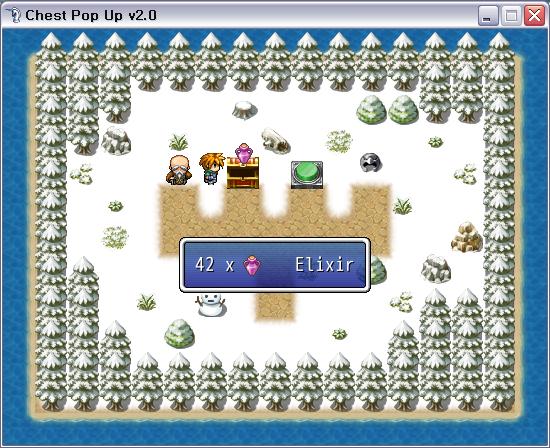  Chest_Pop_Up20.exe Chest_Pop_Up20.exe |
#==============================================================================
# Chest Item Pop-Up
#==============================================================================
# Author : OriginalWij
# Version : 2.0
#==============================================================================
#==============================================================================
# Version Info:
#
# v1.0
# - Initial release
#
# v1.1
# - Added description window
#
# v1.2a
# - Bug fix and added forgotten aliases
#
# v1.3
# - Added option to only popup once for many of the same item
#
# v2.0
# - Added option to turn popup sound on/off
# - Added option to turn popup text on/off
# - Added icon to name popup and the ability to turn it on/off
# - Added adjustable X & Y coordinates for name popup window
# - Reworked name popup window (won't show "1 x" if only one item)
# - Reworked gold display (more efficient)
# - Added "call" feature - with and without adding the item to inventory
# - Added option to wait for button or time for popup name window
# - Added options to define button and time for popup name window wait
# - Added option to enable/disable the "close window" sound
# - Added options to define "close window" sound
#==============================================================================
#==============================================================================
# To use: turn on the switch (designated below) BEFORE each gold/item addition
#
# To call:
# $scene = Chest_Popup.new(x, y, type, amount, index, add = false)
# x : X coordinate to popup item at
# y : Y coordinate to popup item at
# type : 0 :gold, 1 :items, 2 :weapons, 3 :armor
# amount : number of items "gaining"
# index : item ID
# add : adds item(s) shown into inventory if true (default = false)
#==============================================================================
# NOTE: when adding multiple (different) items, insert a WAIT(1) between them
# NOTE: the switch turns itself off after each "add item/gold" event command
#==============================================================================
# Switch to activate popup
POPUP_SWITCH = 1
# "Gold" icon index number
GOLD_ICON = 205
# Play sound on popup?
PLAY_POPUP_SOUND = true
# Sound to play upon popup (if PLAY_POPUP_SOUND = true)
POPUP_SOUND = 'Chime2'
POPUP_SOUND_VOLUME = 100
POPUP_SOUND_PITCH = 150
# Play "close window" sound?
PLAY_CLOSE = true
# Sound to play upon popup close (if PLAY_CLOSE = true)
CLOSE_SOUND = 'Cancel'
CLOSE_SOUND_VOLUME = 80
CLOSE_SOUND_PITCH = 100
# Only popup once for many of the same item
ONLY_SHOW_ONE = true
# Show popup text?
SHOW_POPUP_TEXT = true
# Show icon with popup text? (if SHOW_POPUP_TEXT = true)
SHOW_POPUP_TEXT_ICON = true
# Popup text window Y coordinate (if SHOW_POPUP_TEXT = true)
TEXT_WINDOW_Y = 208
# Popup text window X coordinate offset (if SHOW_POPUP_TEXT = true)
# 0 (Zero) : centered in the window
# negative integer : offset left (centered)
# positive integer : offset right (centered)
TEXT_WINDOW_X_OFFSET = 0
# Wait for button to close? (false = time wait) (if SHOW_POPUP_TEXT = true)
WAIT_FOR_BUTTON = true
# Button to wait for (if WAIT_FOR_BUTTON = true and SHOW_POPUP_TEXT = true)
BUTTON_TO_WAIT_FOR = Input::C
# Frames to wait (if WAIT_FOR_BUTTON = false and SHOW_POPUP_TEXT = true)
WAIT_FOR_TIME = 120
#==============================================================================
# Game_Interpreter
#==============================================================================
class Game_Interpreter
#--------------------------------------------------------------------------
# Get X
#--------------------------------------------------------------------------
def get_x
events = $game_map.events
x_coord = events[@event_id]
return x_coord.screen_x
end
#--------------------------------------------------------------------------
# Get Y
#--------------------------------------------------------------------------
def get_y
events = $game_map.events
y_coord = events[@event_id]
return y_coord.screen_y
end
#--------------------------------------------------------------------------
# Change Gold
#--------------------------------------------------------------------------
alias chest_pop_command_125 command_125 unless $@
def command_125
value = operate_value(@params[0], @params[1], @params[2])
x_value = get_x if $game_switches[POPUP_SWITCH]
y_value = get_y if $game_switches[POPUP_SWITCH]
$scene = Chest_Popup.new(x_value, y_value, 0, value, 1) if $game_switches[POPUP_SWITCH]
chest_pop_command_125
end
#--------------------------------------------------------------------------
# Change Items
#--------------------------------------------------------------------------
alias chest_pop_command_126 command_126 unless $@
def command_126
value = operate_value(@params[1], @params[2], @params[3])
x_value = get_x if $game_switches[POPUP_SWITCH]
y_value = get_y if $game_switches[POPUP_SWITCH]
$scene = Chest_Popup.new(x_value, y_value, 1, value, @params[0]) if $game_switches[POPUP_SWITCH]
chest_pop_command_126
end
#--------------------------------------------------------------------------
# Change Weapons
#--------------------------------------------------------------------------
alias chest_pop_command_127 command_127 unless $@
def command_127
value = operate_value(@params[1], @params[2], @params[3])
x_value = get_x if $game_switches[POPUP_SWITCH]
y_value = get_y if $game_switches[POPUP_SWITCH]
$scene = Chest_Popup.new(x_value, y_value, 2, value, @params[0]) if $game_switches[POPUP_SWITCH]
chest_pop_command_127
end
#--------------------------------------------------------------------------
# Change Armor
#--------------------------------------------------------------------------
alias chest_pop_command_128 command_128 unless $@
def command_128
value = operate_value(@params[1], @params[2], @params[3])
x_value = get_x if $game_switches[POPUP_SWITCH]
y_value = get_y if $game_switches[POPUP_SWITCH]
$scene = Chest_Popup.new(x_value, y_value, 3, value, @params[0]) if $game_switches[POPUP_SWITCH]
chest_pop_command_128
end
end
#==============================================================================
# Item Popup Window
#==============================================================================
class Item_Popup_Window < Window_Base
#--------------------------------------------------------------------------
# Initialize
#--------------------------------------------------------------------------
def initialize(x, y)
super(0, 0, 544, 416)
self.opacity = 0
@x = x - 26
@y = y - 56
end
#--------------------------------------------------------------------------
# Pop-Up
#--------------------------------------------------------------------------
def pop_up(icon_index, x, y)
self.contents.clear
draw_icon(icon_index, x, y, true)
end
end
#==============================================================================
# Name window
#==============================================================================
class Name_Window < Window_Base
#--------------------------------------------------------------------------
# Initialize
#--------------------------------------------------------------------------
def initialize(x, y, desc, no_desc, desc_size, gold = false, icon = 0)
width = desc.size * 12
super(x, y, width, WLH + 32)
self.width = self.contents.text_size(desc).width + 32
self.x = ((544 - self.width) / 2) + TEXT_WINDOW_X_OFFSET
create_contents
if SHOW_POPUP_TEXT_ICON
if no_desc
draw_icon(icon, 0, 0) unless gold
else
if desc_size == 2
draw_icon(icon, 46, 0) unless gold
else
draw_icon(icon, 34, 0) unless gold
end
end
end
self.contents.draw_text(0, 0, width, WLH, desc, 0) unless gold
self.contents.draw_text(4, 0, width, WLH, desc, 0) if gold
draw_icon(GOLD_ICON, width - 66, 0, true) if gold
end
end
#==============================================================================
# Scene_Base
#==============================================================================
class Scene_Base
#--------------------------------------------------------------------------
# Create Snapshot for Using as Background of Another Screen
#--------------------------------------------------------------------------
def snapshot_for_background
$game_temp.background_bitmap.dispose
$game_temp.background_bitmap = Graphics.snap_to_bitmap
$game_temp.background_bitmap.blur unless $game_switches[POPUP_SWITCH]
end
end
#==============================================================================
# Chest_Popup
#==============================================================================
class Chest_Popup < Scene_Base
#--------------------------------------------------------------------------
# Initialize
#--------------------------------------------------------------------------
def initialize(x, y, type, amount, index, add = false)
$game_switches[POPUP_SWITCH] = true
@x = x
@y = y
@amount = amount
@gold = false
@no_desc = false
@desc_size = 1
@desc_size = 2 if amount > 9
case type
when 0 # gold
@desc_size = 1
$game_party.gain_gold(amount) if add
@icon_index = GOLD_ICON
@desc_amount = ''
@desc = @amount.to_s
@amount = 1
@gold = true
when 1 # items
$game_party.gain_item($data_items[index], amount) if add
@icon_index = $data_items[index].icon_index
@desc_amount = @amount.to_s + ' x'
if @amount == 1
@desc_amount = ''
@no_desc = true
end
@desc = $data_items[index].name
@amount = 1 if ONLY_SHOW_ONE
when 2 # weapons
$game_party.gain_item($data_weapons[index], amount) if add
@icon_index = $data_weapons[index].icon_index
@desc_amount = @amount.to_s + ' x'
if @amount == 1
@desc_amount = ''
@no_desc = true
end
@desc = $data_weapons[index].name
@amount = 1 if ONLY_SHOW_ONE
when 3 # armors
$game_party.gain_item($data_armors[index], amount) if add
@icon_index = $data_armors[index].icon_index
@desc_amount = @amount.to_s + ' x'
if @amount == 1
@desc_amount = ''
@no_desc = true
end
@desc = $data_armors[index].name
@amount = 1 if ONLY_SHOW_ONE
end
if @gold
@desc = @desc + ' '
else
if SHOW_POPUP_TEXT_ICON
@desc = @desc_amount + ' ' + @desc
else
@desc = @desc_amount + ' ' + @desc
end
end
end
#--------------------------------------------------------------------------
# Start
#--------------------------------------------------------------------------
def start
create_background
@popup_window = Item_Popup_Window.new(@x, @y)
end
#--------------------------------------------------------------------------
# Terminate
#--------------------------------------------------------------------------
def terminate
@popup_window.dispose
@menuback_sprite.dispose
@name_window.dispose if SHOW_POPUP_TEXT
end
#--------------------------------------------------------------------------
# Return Scene
#--------------------------------------------------------------------------
def return_scene
$game_switches[POPUP_SWITCH] = false
$scene = Scene_Map.new
end
#--------------------------------------------------------------------------
# Update
#--------------------------------------------------------------------------
def update
super
@popup_window.update
@menuback_sprite.update
do_popup
end
#--------------------------------------------------------------------------
# Update Basic
#--------------------------------------------------------------------------
def update_basic
Graphics.update
Input.update
$game_map.update
end
#--------------------------------------------------------------------------
# Wait
#--------------------------------------------------------------------------
def wait(duration)
for i in 0...duration
update_basic
end
end
#--------------------------------------------------------------------------
# Wait for close
#--------------------------------------------------------------------------
def wait_for_close
count = 0
loop do
update_basic
count += 1
break if Input.trigger?(BUTTON_TO_WAIT_FOR) and WAIT_FOR_BUTTON
break if count >= WAIT_FOR_TIME and !WAIT_FOR_BUTTON
end
end
#--------------------------------------------------------------------------
# Create Background
#--------------------------------------------------------------------------
def create_background
@menuback_sprite = Sprite.new
@menuback_sprite.bitmap = $game_temp.background_bitmap
@menuback_sprite.update
end
#--------------------------------------------------------------------------
# Show Name
#--------------------------------------------------------------------------
def show_name
x = 272
y = TEXT_WINDOW_Y
@name_window = Name_Window.new(x, y, @desc, @no_desc, @desc_size, @gold, @icon_index)
wait_for_close
Audio.se_play('Audio/SE/' + CLOSE_SOUND, CLOSE_SOUND_VOLUME, CLOSE_SOUND_PITCH) if WAIT_FOR_BUTTON and PLAY_CLOSE
end
#--------------------------------------------------------------------------
# Do Pop-Up
#--------------------------------------------------------------------------
def do_popup
for i in 1..@amount
Audio.se_play('Audio/SE/' + POPUP_SOUND, POPUP_SOUND_VOLUME, POPUP_SOUND_PITCH) if PLAY_POPUP_SOUND
for i in 0..4
@popup_window.pop_up(@icon_index, @x - 26, @y - (i * 4) - 48)
@popup_window.update
wait(2)
end
wait(5) if i != @amount
end
wait(5)
show_name if SHOW_POPUP_TEXT
return_scene
end
end
