

http://rpgmaker.net/engines/rm2k3/utilities/32/
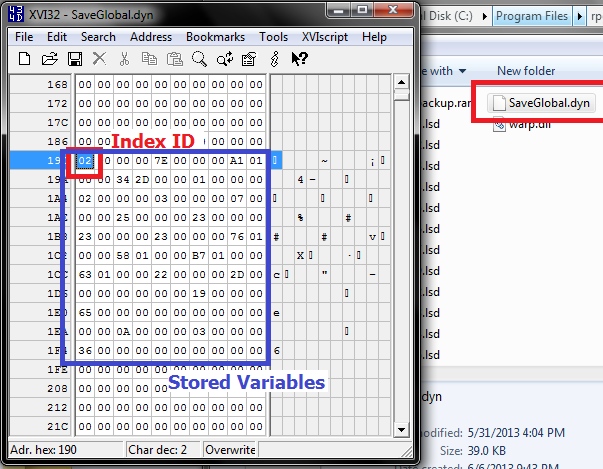
SaveGlobal.dyn라는 별도의 파일에 각 세이브 파일에 대응하는 글로벌 변수를 저장하고 사용하는 기능을 통해 궁극적으로는 커스텀 세이브/로드 시스템을 구현하려는 시도에서 만들어진 플러그인입니다. DynRPG가 설치된 프로젝트에서만 구동 가능하며, DynPlugins 폴더 안에 해당 플러그인의 dll 파일이 들어 있습니다. 위 링크를 통해 배포페이지에서 해당 플러그인의 데모 파일을 다운로드 받을 수 있습니다. DynRPG에 대한 내용은 "습작의 스크립트 이야기 : 번외편 - 7편 : DynRPG(http://avangs.info/1031048)"를 참고해주세요. 해당 플러그인의 자세한 사용법에 대한 내용은 리드미를 참고하세요.
#. 리드미 내용
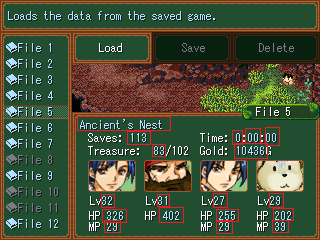
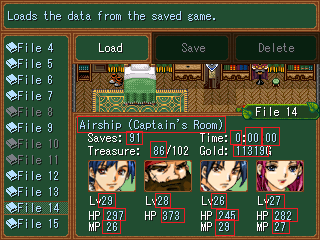
======================================================================== CMS Tools: Global Save Data (Store a range of variables) v1.0 For RPG Maker 2003 with DynRPG v0.13 or higher By PepsiOtaku ======================================================================== This plugin was designed to work alongside the CustomSaveLoad patch. It saves variables from a particular save file into a binary "database" (SaveGlobal.dyn) and assigns them an identifier based on the save file (Save13.lsd = an id of 13). Using this identifier, the plugin can import those variables from another save file. This was built specifically for making a custom save/load menu. Imagine you are pressing up/down through save files. Each time you do this, the menu needs to load specific pieces of data like HP & MP for each character, gold, time played, etc. Each file has a separate set of data that has to be loaded on the spot. This simplifies this process by using a variable called "ExportVar" as an export trigger (for saving) and a variable called "ImportVar" as an import trigger (for loading). Set the ExportVar to the Save ID to index your variable range, and set the ImportVar to the index you want to load. VarRangeStart and VarRangeEnd are used to define the variable range you wish to export/import. Specifically, if you set your ExportVar to a number (9 for example), it takes what's currently stored in VarRangeStart-VarRangeEnd and places it into the SaveGlobal.dyn file under an index of "09." If you set the ExportVar to 37, it will do the same thing in an index of "37." Indexes are stored in binary format in sequential order, so between save 9 and 37 would be a a ton of zeros if there was no data saved within indexes 10-36. For loading, set the ImportVar to the index number, and it will load the data for VarRangeStart-VarRangeEnd and store them in those variables for the save file you have loaded. In my case, the index id's are the save slots. This way, you could be in Save 37, and see what's those 100 variables were in Save 9. The one exception is that you can't use "0" for an index number. It has to be at least 1 due to how the binary file is structured. With that in mind, if your range is 4101-4200, You could use the set variable command to set variable 4101 to a number representing a party member, v4102 to that member's max HP, v4103 to their max MP, etc. You can kind of interpret that functionality in any way that would suit you, be it a save system, a high score system or anything else you can think up that uses variables. NOTE: Stick to small variable ranges. I wouldn't use more than 100 variables in your range, as you may get unpredictable results, or crashes. NOTE 2: Do not set your variable range to 100 vars, save a bunch of games, and then set your range to 200 vars as this will corrupt the data in SaveGlobal.dyn. You must delete your old SaveGlobal.dyn, and then let the plugin create a new one. Installation ------------- To install the plugin, make sure that you have patched your project with cherry's AutoEnter patch, CustomSaveLoad patch, and DynRPG 1. Patch DynRPG onto your BetterAEP/CustomSaveLoad RPG_RT.exe. 2. Copy the "global_save_data.dll"into the DynPlugins folder of your own project. 3. Add the following (between the asterisks) to your DynRPG.ini ********************************************** [global_save_data] VarRangeStart=4101 VarRangeEnd=4130 ExportVar=3346 ImportVar=3351 ********************************************** 4. Change the numeric values to the variables of your choice. Again, it's super important that you stick to less than 100 variables in your range. You probably don't need more than that anyway. Note: If you want to use this for a custom save/load menu, make sure you install Cherry's CustomSaveLoad patch alongside BetterAEP. Using my default variable choices, you should have this setup: (this is just my naming scheme, but you get the idea) 3346: AEPSL-SaveSwitch --> ExportVar 3350: AEP-Selector --> Used by the AutoEnterPatch. 0 to launch the load menu, 2 to quit 3351: AEPSL-SaveID --> used to query 3352: AEPSL-SaveExists --> 1 if save exits, 0 if it doesn't 3353: AEPSL-HeroLevel --> not used 3354: AEPSL-HeroHP --> not used 3355: DynRPG-LoadSaveInfo --> ImportVar 4101-4130 (The "global" variables) - Hero ID, Level, HP, MP for all 4 party members (16 vars), saves, location, gold, playtime hours/mins/seconds (3 vars) was my setup Instructions ------------- The nature of how this plugin gets used is very complex, so I'd recommend getting comfortable with Cherry's BetterAEP & CustomSaveLoad patch before trying to figure this out. 1. In your save file event call, set all of the vars you're using in your range to their respective values and then add the following: <>Variable Oper: [3346:AEPSL-SaveSwitch] Set, Var [FileSelected]'s Value (FileSelected is used as the index id) <>Wait: 0.1 Sec <>Variable Oper: [3351:AEPSL-SaveID] Set, Var [FileSelected]'s Value <>Open Save Menu (in The SaveLoad patch, this saves the file defined in the previous line) 2. In your menu, when you select a file, you should have some kind of a "LoadFile" event call. In this event call, first set your var range to 0 (to reset all vars before loading them from SaveGlobal.dyn). At this point, you should also have a variable set to the selected file (I'll call "FileSelected"). Do the following: <>Variable Oper: [3351:AEPSL-SaveID] Set, Var [FileSelected]'s Value <>Variable Oper: [3355:DynRPG-LoadSaveInfo] Set, Var [FileSelected]'s Value <>Variable Oper: [3352:AEPSL-SaveExists] Set, Var [3351:AEPSL-SaveID]'s Value <>Branch if Var [3342:AEPSL-SaveExists] is 1 (At this point, all of your vars have been loaded, so you can refer to them and draw them on screen using DynText) |
